Data connectivity and integration
Institution: MIT
23 study materials · 6 sections
This course provides a comprehensive deep dive into Palantir Foundry's data connectivity and integration suite, which transcends traditional ETL/ELT methodologies. Students will explore how to build robust, scalable data pipelines using a unified framework that integrates connectivity, transformation, and management. The curriculum covers a wide range of data types—from batch datasets and unstructured media sets to real-time streams—while emphasizing security, lineage, and operational reliability.
Course Sections
Foundations of Foundry Data Integration
Key concepts: Data Connectivity Framework · Multimodal Compute Transformation · Data Lineage · Software-Defined Data Integration (SDDI)
An introduction to the core philosophy of Foundry's data integration suite, focusing on the move from traditional ETL to a unified, multimodal compute environment.
Foundations of Foundry Data Integration
Overview
Foundry provides a comprehensive data integration suite designed to manage complex, heterogeneous data environments. Unlike traditional Extract-Transform-Load (ETL) tools that often result in brittle, "black-box" pipelines, Foundry emphasizes a unified framework where connectivity, transformation, and pipeline management coexist with strict security and granular data lineage.
At its core, Foundry treats data integration not as a series of one-off scripts, but as a Software-Defined Data Integration (SDDI) problem. This means that the movement and transformation of data are governed by metadata, versioned like source code, and orchestrated through a robust compute abstraction layer. This lecture explores the four pillars of this foundation: the Data Connectivity Framework, Multimodal Compute Transformation, Data Lineage, and SDDI.
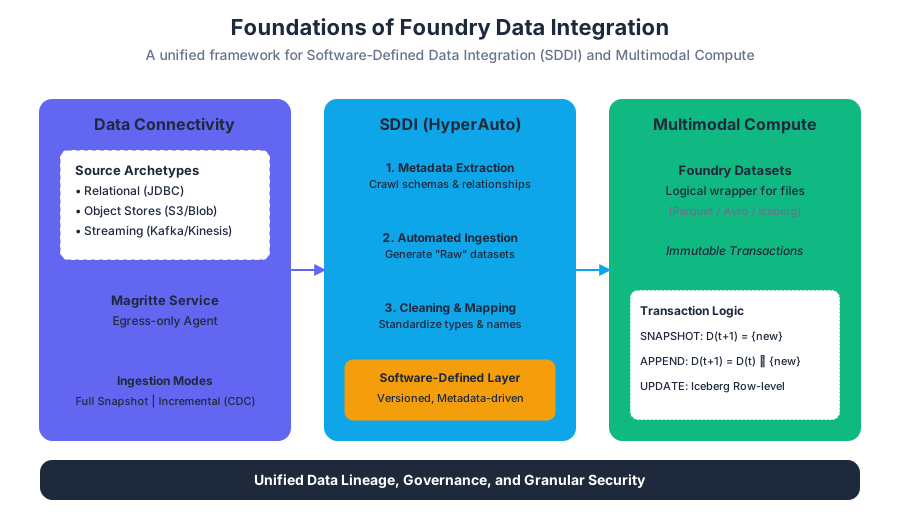
AI_SVGI_SVG## Data Connectivity Framework The Data Connectivity Framework is the ingress layer of the Foundry ecosystem. It is designed to abstract the complexities of interacting with disparate source systems—ranging from legacy on-premise relational databases to modern cloud-native object stores and streaming platforms.
The Data Connection Application
The primary interface for this framework is the Data Connection application. It serves as a centralized hub for managing "Sources" (the definitions of external systems) and "Syncs" (the specific configurations for moving data).
Foundry categorizes connectors into several high-level archetypes based on their protocol and data structure:
| Connector Category | Example Sources | Primary Use Case |
|---|---|---|
| Relational (JDBC) | Oracle, Postgres, SQL Server, SAP HANA | Structured business data, ERP systems. |
| Object Stores | Amazon S3, Azure Blob (ABFS), Google Cloud Storage | Unstructured data, data lakes, large-scale logs. |
| SaaS / API | Salesforce, ServiceNow, Workday | High-level business entities and CRM data. |
| Streaming | Kafka, AWS Kinesis, Azure Event Hubs | Real-time telemetry, IoT, and event-driven logs. |
| Specialized | ERP (SAP), CRM, NoSQL (MongoDB, Cassandra) | Systems requiring proprietary drivers or complex extraction logic. |
Mechanics of Data Ingress
When a sync is initiated, Foundry’s Magritte service (the underlying connectivity engine) establishes a secure tunnel to the source. This is often achieved via an Agent—a lightweight Java process installed within the client’s network—which facilitates egress-only communication to Foundry. This architecture ensures that sensitive source systems do not need to expose open ports to the public internet.
The framework supports multiple ingestion modes:
- Full Snapshot: The entire table or file set is ingested, replacing the previous version in Foundry.
- Incremental / Change Data Capture (CDC): Only new or modified records are ingested, typically identified by a high-watermark (e.g., an
updated_attimestamp) or a transaction log.
Software-Defined Data Integration (SDDI)
Software-Defined Data Integration (SDDI) represents a paradigm shift from manual pipeline engineering to automated, metadata-driven orchestration. In a traditional ETL environment, adding a new source requires writing a new script. In an SDDI environment, the system uses the source's own metadata to "write" the integration logic.
HyperAuto and Automated Pipelines
A cornerstone of SDDI in Foundry is HyperAuto. HyperAuto leverages the metadata of source systems (such as SAP or Oracle) to automatically generate the initial layers of a data pipeline.
Definition (SDDI): A methodology where the data integration lifecycle—discovery, ingestion, modeling, and maintenance—is managed through high-level software abstractions and metadata, rather than manual imperative coding.
The SDDI process follows a formal sequence:
- Metadata Extraction: The system crawls the source system to identify tables, primary keys, foreign key relationships, and data types.
- Automated Ingestion: Based on the metadata, the system creates "Raw" datasets in Foundry.
- Cleaning and Standardization: Automated transforms apply standard naming conventions, cast types to Foundry-compatible formats, and handle null values.
- Relationship Mapping: The system reconstructs the source's relational schema within Foundry, creating a "Clean" layer that mirrors the source but is optimized for analytical compute.
Advantages of the SDDI Approach
By treating integration as software, Foundry enables:
- Scalability: Integrating 1,000 tables takes nearly the same effort as integrating 10.
- Consistency: Every table follows the same naming and typing conventions.
- Resilience: If the source schema changes, the SDDI layer can automatically detect the drift and alert the maintainer or, in some cases, adapt the pipeline.
Multimodal Compute Transformation
Once data is within the Foundry environment, it must be transformed into a usable state. Foundry’s Multimodal Compute architecture allows users to choose the best tool for the job—whether it is visual, code-based, batch, or streaming—while maintaining a unified underlying data representation.
Datasets and Transactions
The fundamental unit of data in Foundry is the Dataset. A dataset is a logical wrapper around files (usually Parquet or Avro) stored in the backing filesystem. Every change to a dataset is recorded as a Transaction.
| Transaction Type | Description | Mathematical Representation |
|---|---|---|
| SNAPSHOT | Replaces all existing data in the dataset. | $D_{t+1} = {x_{new}}$ |
| APPEND | Adds new data to the existing set. | $D_{t+1} = D_t \cup {x_{new}}$ |
| UPDATE | Modifies specific rows (requires Iceberg or specialized logic). | $D_{t+1} = (D_t \setminus {x_{old}}) \cup {x_{modified}}$ |
| DELETE | Removes specific rows. | $D_{t+1} = D_t \setminus {x_{target}}$ |
Code-Based vs. Visual Transformation
Foundry supports two primary modes of transformation:
- Code Repositories: High-control environment using Python (PySpark), Java, or SQL. This is preferred for complex logic, UDFs (User Defined Functions), and unit-tested production pipelines.
- Pipeline Builder: A low-code, visual interface that allows users to build DAGs (Directed Acyclic Graphs) through a "point-and-click" experience. It compiles the visual logic into optimized Spark code under the hood.
Streaming and Media Sets
Beyond tabular data, Foundry handles:
- Streams: Low-latency data representations that use a "hot" buffer for immediate processing and a "cold" archive for long-term storage.
- Media Sets: Specialized containers for unstructured data (images, audio, DICOM files). Media sets allow for the same versioning and lineage as tabular datasets but are optimized for random access and large-file processing.
# Example: A high-signal PySpark transform in Foundry
from transforms.api import transform_df, Input, Output
from pyspark.sql import functions as F

@transform_df(
    Output("/Company/Production/Clean/flight_data_cleaned"),
    raw_data=Input("/Company/Production/Raw/flight_data_raw"),
)
def compute_flight_metrics(raw_data):
    """
    Standardizes timestamps and calculates flight duration.
    This demonstrates the 'Clean' layer of an SDDI pipeline.
    """
    return raw_data.select(
        F.col("flight_id").cast("string"),
        F.to_timestamp("departure_time", "yyyy-MM-dd HH:mm:ss").alias("departure_ts"),
        F.to_timestamp("arrival_time", "yyyy-MM-dd HH:mm:ss").alias("arrival_ts")
    ).withColumn(
        "duration_minutes",
        (F.unix_timestamp("arrival_ts") - F.unix_timestamp("departure_ts")) / 60
    ).filter(F.col("duration_minutes") > 0)
AI_DEMOI_DEMO## Data Lineage and Security In Foundry, Data Lineage is not a post-hoc documentation exercise; it is a native property of the system. Every dataset "knows" its parents and its children.
The Directed Acyclic Graph (DAG)
The entire data ecosystem in Foundry is represented as a massive DAG. When a user views a dataset, they can instantly see the "Lineage View," which traces the data back to the original source system and forward to every dashboard or model that consumes it.
Branching: Git for Data
One of Foundry’s most innovative features is Branching. Just as software engineers branch code, data engineers can branch data.
When you create a branch (e.g., feature/new-logic), Foundry creates a virtual view of the data. It uses a Copy-on-Write mechanism:
- If the data on the branch is identical to the
masterbranch, no data is duplicated. - If a transform is run on the branch, the new output is stored separately.
- This allows for safe experimentation without impacting production datasets.
Security Propagation
Foundry uses Mandatory Access Control (MAC) via "Markings." If a raw dataset is marked as SENSITIVE_PII, that marking automatically propagates down the lineage. Any derived dataset, even after ten transformations, will inherit that marking, ensuring that security is "sticky" and cannot be accidentally bypassed by a downstream user.
Pipeline Management and Reliability
A production-grade pipeline requires more than just code; it requires orchestration, monitoring, and quality guarantees.
Builds and Schedules
A Build is the execution of a job to produce a new version of a dataset. Builds are managed by the Build Service, which resolves the dependency graph to ensure that parent datasets are updated before children. Schedules automate these builds based on triggers:
- Time-based: Run every day at 8:00 AM.
- Event-based: Run whenever the source dataset is updated.
Health Checks
To ensure data quality, engineers attach Health Checks to datasets. These are automated tests that run after a build.
| Health Check Type | Purpose | Example Metric |
|---|---|---|
| Freshness | Ensures data is up to date. | "Error if data is > 24 hours old." |
| Status | Monitors build success/failure. | "Alert if the last 3 builds failed." |
| Schema | Detects breaking changes in columns. | "Error if column 'user_id' is missing." |
| Content | Validates data values. | "Alert if % of nulls in 'email' > 5%." |
Advanced Concept: Apache Iceberg Integration
Foundry has recently integrated support for Apache Iceberg, an open table format for huge analytic datasets. Iceberg brings several "database-like" features to the data lake:
- Atomic Transactions: Ensures that readers never see partial or inconsistent data.
- Schema Evolution: Allows adding, renaming, or dropping columns without rewriting the entire table.
- Hidden Partitioning: Simplifies how users query data by handling partition pruning automatically.
- Time Travel: Allows users to query previous versions of the data using specific snapshots.
This integration is particularly vital for high-scale environments where UPDATE and DELETE operations (common in GDPR compliance or CDC workflows) would be prohibitively expensive in standard Parquet-based datasets.
Common Pitfalls in Data Integration
Even with Foundry's robust tools, certain anti-patterns can emerge:
- Over-Branching: Creating too many long-lived branches can lead to "merge hell" and storage overhead.
- Ignoring the "Raw" Layer: Attempting to perform complex logic during the initial ingestion sync. Best practice dictates a "Pass-through" sync where the raw data is landed exactly as it exists in the source.
- Circular Dependencies: Designing pipelines where Dataset A depends on B, and B depends on A. Foundry’s compiler will catch this, but it often indicates a flaw in the logical data model.
- Opaque Transforms: Writing massive, 1000-line PySpark functions instead of breaking them into modular, readable datasets. This defeats the purpose of granular lineage.
Data Representation: Datasets, Media Sets, and Iceberg
Key concepts: Datasets · Transactions (SNAPSHOT, APPEND) · Media Sets · Apache Iceberg · Views
Understanding how Foundry stores and represents different types of data, including tabular, unstructured, and open-source formats.
Data Representation: Datasets, Media Sets, and Iceberg
In the architecture of modern data platforms, the representation of data is the bridge between raw storage and operational intelligence. In Foundry, data representation is not merely a file format or a table definition; it is a managed, versioned, and multi-modal abstraction layer. This layer allows users to interact with data ranging from structured tabular records to massive unstructured video archives, all while maintaining strict ACID (Atomicity, Consistency, Isolation, Durability) properties and lineage tracking.
At its core, Foundry moves away from the "data swamp" model—where files are dumped into a filesystem—toward a Software-Defined Data Integration (SDDI) model. Here, every data asset is a first-class citizen with a lifecycle, a schema, and a history.
AI_SVGThe infographic above illustrates the hierarchy of data representation in Foundry: starting from the Backing Filesystem (S3/HDFS), moving through the Transactional Layer (Datasets), and branching into specialized formats like Media Sets for unstructured data and Apache Iceberg for open-source interoperability.*
The Dataset: The Atomic Unit of Foundry
A Dataset is the fundamental representation of data in Foundry. It is often misunderstood as a "table," but it is more accurately described as a managed wrapper around a collection of files stored in a backing filesystem.
What it is
Mathematically, a dataset $D$ can be defined as a tuple $D = (F, M, S, T)$, where:
- $F$ is the set of underlying files (e.g., Parquet, CSV, Avro).
- $M$ is the metadata (lineage, security markings, properties).
- $S$ is the schema (column names, types, and constraints).
- $T$ is the transaction log, representing the state of $D$ at any point in time $t$.
Why it matters
Traditional filesystems lack a native concept of "versioning" or "schema enforcement." If a process fails halfway through writing a CSV, the file is corrupted or incomplete. Datasets solve this by introducing Transactions. No data is "visible" to the rest of the platform until a transaction is successfully committed.
How it works: Transactions
Foundry uses an immutable storage pattern. When you "update" a dataset, you are not modifying existing files; you are creating new files and updating the transaction log to point to the new state.
| Transaction Type | Logic | Typical Use Case |
|---|---|---|
| SNAPSHOT | Replaces the entire content of the dataset. Previous files are ignored in the current view. | Daily full loads from a source system; small lookup tables. |
| APPEND | Adds new files to the existing collection without modifying old ones. | High-frequency sensor data; log ingestion. |
| UPDATE | Modifies specific records (primarily in Iceberg or specialized formats). | GDPR "Right to be Forgotten" requests; correcting specific rows. |
| DELETE | Removes specific files or records from the current view. | Data retention policy enforcement. |
Key Insight: A Dataset "View" is the logical result of all successful transactions on a specific branch. When a user queries a dataset, the system resolves the transaction log to determine exactly which files constitute the "current" state.
Code Example: Defining a Dataset Transaction
In a Python-based transform, the interaction with the dataset representation is handled via the TransformOutput and TransformInput abstractions.
from transforms.api import transform, Input, Output

@transform(
    output=Output("/Company/Project/processed_data"),
    raw_input=Input("/Company/Project/raw_source")
)
def compute_dataset(output, raw_input):
    # The 'filesystem()' method provides access to the underlying files
    df = raw_input.dataframe()

    # Logic to process data
    processed_df = df.filter(df['status'] == 'ACTIVE')

    # Writing the output triggers a SNAPSHOT transaction by default
    # This ensures atomicity: if the write fails, the dataset remains at its previous state
    output.write_dataframe(processed_df)
Media Sets: Scaling Unstructured Data
While datasets excel at tabular data, modern enterprises deal with "dark data"—unstructured assets like high-resolution satellite imagery, DICOM medical files, and audio recordings. Media Sets are specialized representations designed to handle these at scale.
What it is
A Media Set is a collection of media files that share a Common Schema. Unlike a standard dataset that might treat a video as a binary blob in a row, a Media Set treats the media as the primary object, providing optimized storage and compute paths for analysis.
Why it matters
Standard ETL tools struggle with files that are gigabytes in size or require specialized headers (like geospatial metadata in GeoTIFFs). Media Sets allow for:
- Random Access: Reading specific frames of a video without downloading the whole file.
- Streaming Compute: Passing media through ML models (e.g., object detection) efficiently.
- Integrated Visualization: Native support for viewing complex formats (DICOM, PDF) directly in the browser.
Comparison: Datasets vs. Media Sets
| Feature | Dataset (Tabular) | Media Set (Unstructured) |
|---|---|---|
| Primary Unit | Row / Record | File / Object |
| Storage Format | Parquet, CSV, Avro | JPEG, MP4, DICOM, PDF |
| Schema | Columnar (Name, Type) | Metadata-based (Resolution, Duration) |
| Access Pattern | SQL / Vectorized Read | Byte-range / Streaming |
| Compute Engine | Spark / Flink | Pipeline Builder / Custom Sidecars |
Apache Iceberg: The Open Table Format
Foundry has increasingly adopted Apache Iceberg to provide a high-performance, open-source table format that bridges the gap between Foundry's internal storage and the broader data ecosystem.
What it is
Apache Iceberg is a high-performance format for huge analytic tables. It brings SQL-like capabilities to big data files (like Parquet). In Foundry, Iceberg is used as the backing format for datasets that require row-level atomicity.
How it works: The Metadata Layer
Iceberg works by maintaining a manifest of files. Instead of scanning a directory to find files (which is slow in S3), Iceberg reads a hierarchical metadata tree:
- Iceberg Catalog: Points to the current "metadata file."
- Metadata File: Contains snapshots of the table.
- Manifest List: Lists the manifest files for a snapshot.
- Manifest File: Lists the individual data files and their statistics (min/max values for columns).
Why Iceberg is a Game Changer
- Hidden Partitioning: Users don't need to know how data is partitioned to query it efficiently.
- Schema Evolution: You can add, rename, or drop columns without rewriting the entire dataset.
- Time Travel: Users can query a dataset as it existed at a specific timestamp or snapshot ID.
- Row-Level Operations: Enables
MERGE INTO,UPDATE, andDELETEcommands, which are traditionally difficult in immutable big data environments.
AI_DEMOI_DEMOImagine a slider representing time. As you move the slider, the Iceberg metadata pointers shift between different snapshots, instantly changing the "current" view of the table without moving a single byte of actual data.*
Virtualization: Dataset Views
A View in Foundry is a virtual dataset. It does not store its own data; instead, it provides a logical transformation or union over one or more backing datasets.
Primary Key Deduplication
One of the most powerful uses of Views is handling Primary Key (PK) Deduplication. In many streaming or incremental pipelines, the same record might be updated multiple times.
- The Problem: An
APPENDtransaction adds the new version of the record, but the old version still exists in a previous file. - The Solution: A View can be configured to perform a "collapse" operation, where only the record with the latest timestamp for a given PK is shown to the user.
Performance Trade-offs
| Metric | Physical Dataset | Virtual View |
|---|---|---|
| Storage Cost | High (Data is duplicated) | Zero (Only metadata) |
| Read Latency | Low (Data is pre-computed) | Higher (Compute happens at read-time) |
| Freshness | Depends on build frequency | Real-time (Reflects source changes) |
Branching: Version Control for Data
One of Foundry's most distinctive features is the application of software engineering principles—specifically Git-style branching—to data representation.
The Mechanics of a Data Branch
When you create a branch (e.g., feature/new-logic) on a dataset, Foundry does not copy the data. It creates a new "pointer" in the transaction log.
- Isolation: Changes made on the
featurebranch are invisible to users on themasterbranch. - Zero-Copy: If the data hasn't changed, both branches point to the same underlying files.
- Merging: When a branch is merged, the transactions from the feature branch are "replayed" or committed to the master branch, ensuring a clean, audited history.
Definition: Fallback Branching. A configuration where if a dataset does not exist on the current branch, the system "falls back" to the master branch. This allows developers to test a single change in a long pipeline without rebuilding the entire upstream dependency chain.
Streaming Representation: Hot and Cold Storage
For low-latency requirements, Foundry uses Streams. A stream is a representation of data that is optimized for "at-the-edge" processing.
The Dual-Storage Model
Foundry Streams utilize a two-tier storage architecture:
- Hot Buffer: A high-throughput, low-latency storage (often backed by Kafka or similar) that holds recent data for immediate processing by Flink or Stream Proxy.
- Cold Storage (Archival): As data ages, it is automatically compacted into standard Parquet files and stored as a Dataset. This ensures that historical analysis can be performed using standard batch tools without the cost of keeping everything in the "hot" buffer.
Consistency Guarantees
Foundry allows developers to choose their consistency model:
- At-Least-Once: Ensures no data is lost, but duplicates may occur if a process restarts.
- Exactly-Once: Uses checkpointing to ensure that every record is processed exactly once, essential for financial or regulatory use cases.
Common Pitfalls in Data Representation
- Transaction Mismatch: Using
APPENDfor data that should beSNAPSHOT. This leads to massive duplication and "data explosion" where the dataset grows indefinitely with redundant records. - Schema Drift: Changing the source data format without updating the Foundry schema. This causes builds to fail during the "Schema Validation" phase of the build lifecycle.
- Ignoring Small File Problem: Performing thousands of tiny
APPENDtransactions. This creates a metadata bottleneck. The solution is to use "Compaction" jobs to merge small files into larger, more efficient Parquet files. - Over-reliance on Views: Creating deeply nested virtual views. While they save storage, the "compute tax" paid at read-time can make dashboards and downstream analysis painfully slow.
AI_FLASHCARDSI_FLASHCARDS Dataset: A managed wrapper around files in a backing filesystem with a transaction log.
- SNAPSHOT: A transaction that replaces all existing data in a dataset.
- APPEND: A transaction that adds new data to a dataset without removing the old.
- Media Set: A specialized representation for large-scale unstructured data sharing a common schema.
- Apache Iceberg: An open table format enabling row-level deletes and schema evolution.
- Branching: A version control mechanism for data that allows isolated experimentation.
- ACID: Atomicity, Consistency, Isolation, Durability—guarantees provided by the transaction system.
- Compaction: The process of merging many small files into fewer large files to improve read performance.
AI_QUIZI_QUIZ. Question: Why is a Foundry Dataset considered "immutable" even though we can add data to it?
- Answer: Because existing files are never modified. An "update" or "append" simply creates new files and updates the transaction metadata to include them in the current view.
- Question: In what scenario would you choose a Media Set over a standard Dataset?
- Answer: When dealing with unstructured data like video, audio, or medical images (DICOM) where you need to store the files themselves rather than just tabular rows.
- Question: How does Apache Iceberg improve performance over standard Parquet datasets?
- Answer: By using a metadata manifest tree that allows for "partition pruning" and "min/max filtering" at the metadata level, avoiding the need to scan the actual data files.
- Question: What is the "Small File Problem"?
- Answer: A performance degradation caused by having too many small files in a dataset, which increases the overhead for the filesystem and the compute engine (Spark).
AI_STUDY_GUIDEI_STUDY_GUIDE*Key Objectives:**
- Understand the distinction between the physical storage (files) and the logical representation (Datasets/Transactions).
- Master the use cases for different transaction types (SNAPSHOT vs. APPEND).
- Explain the architectural benefits of Apache Iceberg in a modern data stack.
- Differentiate between structured (Datasets) and unstructured (Media Sets) data management.
- Recognize how branching and versioning apply to data assets to ensure production stability.
Further Reading:
- Explore the "S3-compatible API" to understand how external tools can treat Foundry Datasets as standard S3 buckets.
- Review "Pipeline Builder" documentation to see how Media Sets are integrated into visual data flows.
- Study "Flink in Foundry" for a deeper dive into how the Hot/Cold storage model enables real-time streaming.
Connecting to External Data Sources
Key concepts: Data Connection Application · JDBC Drivers · Change Data Capture (CDC) · Virtual Tables · S3-compatible API
Exploring the tools and protocols used to ingest data from external systems into Foundry, including JDBC, CDC, and Virtual Tables.
Connecting to External Data Sources
Overview
In the modern enterprise, data is rarely localized. It exists in a fragmented state across legacy on-premise relational databases, modern cloud-native object stores, specialized SaaS applications (ERP/CRM), and high-frequency IoT sensors. The Data Connection application in Foundry serves as the primary gateway for this heterogeneous landscape, transforming disparate external systems into a unified, governed, and actionable "Digital Twin" of the organization.
Unlike traditional Extract-Transform-Load (ETL) tools that focus solely on the movement of bytes, Foundry’s connectivity framework is built on the principle of Software-Defined Data Integration (SDDI). This approach treats data integration as a software engineering discipline, emphasizing versioning, lineage, and metadata-driven automation. By abstracting the complexities of network protocols and authentication schemes, Foundry allows data engineers to focus on the semantic value of the information being ingested.
AI_SVGVisualizing the Data Connection Architecture: From Source Systems (ERP, SQL, S3) through the Data Connection Agent (On-prem/Cloud) into the Foundry Data Foundation (Datasets, Streams, Virtual Tables).*
The Data Connection Framework
The Data Connection application is the centralized interface for managing the lifecycle of external integrations. It operates on a hub-and-spoke model where a central Coordinator manages a fleet of Agents.
The Agent Architecture
To bridge the gap between Foundry’s cloud environment and protected internal networks, Foundry utilizes Data Connection Agents. These are lightweight Java-based services installed within the source system's network (e.g., an on-premise data center or a private VPC).
- Outbound Connectivity: Agents initiate outbound connections to Foundry via HTTPS (port 443). This eliminates the need for inbound firewall exceptions, significantly reducing the security surface area.
- Long Polling: The Agent uses a long-polling mechanism to receive instructions from the Foundry Coordinator. When a "Sync" or "Build" is triggered, the Coordinator places a task in the Agent's queue.
- Local Execution: The Agent executes the query or file-list operation locally, encrypts the data, and streams it back to Foundry in chunks.
Connector Categories
Foundry provides a library of pre-built connectors designed for specific protocols and APIs. These are categorized by their underlying data structures:
| Category | Examples | Primary Use Case |
|---|---|---|
| Relational (JDBC) | Oracle, SQL Server, PostgreSQL, SAP HANA | Structured business logic and transactional records. |
| Object Stores | Amazon S3, Azure Blob (ABFS), HDFS | Large-scale unstructured data, logs, and data lake migration. |
| Enterprise Apps | SAP (OData/BAPI), Salesforce, ServiceNow | High-level business objects and CRM workflows. |
| Streaming | Kafka, Kinesis, MQTT | Real-time telemetry, IoT, and event-driven architectures. |
| NoSQL / Document | MongoDB, Cassandra, Elasticsearch | Semi-structured data and high-performance search indices. |
JDBC Drivers and Advanced Authentication
The Java Database Connectivity (JDBC) protocol remains the workhorse of enterprise data integration. Foundry leverages specialized JDBC drivers—often enhanced by partnerships with providers like CData—to normalize the interaction with hundreds of different SQL and NoSQL dialects.
Beyond Basic Auth
Modern security requirements demand more than simple username/password combinations. Foundry’s JDBC framework supports:
- OAuth 2.0: For cloud-based sources like Snowflake or BigQuery, allowing Foundry to act as a registered application with scoped permissions.
- Certificate-Based Security: Utilizing Java KeyStores (JKS) or PKCS12 files to establish mutual TLS (mTLS) connections.
- Kerberos: Essential for legacy Hadoop environments and strictly managed Active Directory domains, supporting GSSAPI authentication.
Driver Abstraction
The power of Foundry’s JDBC implementation lies in its ability to map source-specific data types to Foundry's internal schema types (e.g., mapping an Oracle NUMBER(19,0) to a Foundry Long). This ensures that downstream transformations are resilient to minor changes in the source system's schema.
Change Data Capture (CDC)
For large-scale relational databases, performing a full "Snapshot" (reading the entire table) every hour is computationally expensive and puts undue stress on the source system. Change Data Capture (CDC) is the mathematical and logical solution to this problem.
The Mechanics of CDC
CDC identifies and captures only the data that has changed since the last successful sync. This is typically achieved through one of two methods:
- Query-based CDC: The Agent queries the source for records where a
last_modified_timestampis greater than the maximum timestamp recorded in the previous Foundry transaction. - Log-based CDC: The Agent (or a sidecar service) reads the database's transaction logs (e.g., SQL Server Transaction Log or Oracle Redo Logs). This captures
INSERT,UPDATE, andDELETEoperations without impacting the database's query engine.
The Merge Logic
When CDC data enters Foundry, it arrives as a series of change events. To reconstruct the "current state" of the table, Foundry applies a merge algorithm. Let $S$ be the set of existing records and $\Delta$ be the set of new change events. The updated state $S'$ is defined by:
$$S' = (S \setminus {r \in S \mid \exists \delta \in \Delta, \text{pk}(\delta) = \text{pk}(r)}) \cup \Delta$$
Where $\text{pk}(x)$ is the primary key of record $x$. In practice, this is handled via the APPEND transaction type and a downstream "Compaction" job that deduplicates records based on the primary key and a versioning column (like a sequence number or timestamp).
CDC vs. Snapshot Comparison
| Feature | Snapshot (Full Sync) | Change Data Capture (CDC) |
|---|---|---|
| Source Impact | High (Full table scan) | Low (Incremental or log-based) |
| Latency | High (Batch-oriented) | Low (Near real-time) |
| Complexity | Low (Simple SELECT *) |
High (Requires PKs and state tracking) |
| Deletions | Handled automatically | Requires "Tombstone" flags or log reading |
Virtual Tables and Compute Pushdown
In some scenarios, moving data into Foundry is undesirable due to data residency requirements, massive volumes, or the need for extreme freshness. Virtual Tables provide a "zero-copy" integration pattern.
What is a Virtual Table?
A Virtual Table is a metadata pointer in Foundry that references data residing in an external system. When a user queries a Virtual Table, Foundry does not look at its own internal storage; instead, it translates the request into the source system's native language (e.g., SQL) and executes it on the fly.
Compute Pushdown
The efficiency of Virtual Tables relies on Compute Pushdown. If a user applies a filter or an aggregation in Foundry, the system attempts to "push" that logic to the source database.
Example Logic: Suppose a user writes a Spark SQL query in Foundry:
SELECT department, SUM(salary)
FROM virtual_employee_table
WHERE region = 'EMEA'
GROUP BY department
Instead of pulling the entire virtual_employee_table into Foundry's memory, the Data Connection layer translates this into a native SQL statement sent to the source Oracle DB:
-- Executed on the source database
SELECT "department", SUM("salary")
FROM "HR_SCHEMA"."EMPLOYEES"
WHERE "region" = 'EMEA'
GROUP BY "department"
Only the aggregated result set is returned to Foundry, minimizing network traffic and leveraging the source system's indexing.
AI_DEMOI_DEMOInteractive Simulation: Toggle between "Full Ingestion" and "Virtual Table with Pushdown" to see the difference in network bandwidth usage and query execution time across different data volumes.*
S3-Compatible API
While most of this section focuses on ingress (bringing data in), the S3-compatible API facilitates seamless egress and interoperability. Foundry can expose its internal datasets via an API that mimics the Amazon S3 protocol.
Why it Matters
Many third-party tools (e.g., SageMaker, PowerBI, or custom Python scripts) are pre-configured to read from S3. By providing an S3-compatible endpoint, Foundry allows these tools to treat a Foundry Dataset as if it were a standard S3 bucket.
- Authentication: Uses Foundry API tokens mapped to S3 Access/Secret keys.
- Path Mapping: A Foundry dataset at
/Project/Data/MyDatasetis mapped to an S3 path likes3://foundry-api/Project/Data/MyDataset/. - Security: All access via the S3 API is governed by Foundry’s granular Access Control Lists (ACLs). If a user does not have permission to view the dataset in Foundry, they cannot access it via the S3 API.
Ingestion Strategies: Batch, Incremental, and Streaming
Choosing the right ingestion strategy is a trade-off between Freshness, Cost, and Consistency.
| Strategy | Mechanism | Best For |
|---|---|---|
| Snapshot | Overwrites the entire dataset on every run. | Small tables, reference data, or sources without timestamps. |
| Append | Adds new files to the dataset without deleting old ones. | Immutable logs, sensor data, or high-volume transactional data. |
| Incremental | Uses a "high-water mark" to pull only new records. | Large tables with reliable updated_at columns. |
| Streaming | Maintains a persistent connection for sub-second updates. | Real-time dashboards, alerting, and IoT telemetry. |
Worked Example: Incremental Sync Logic
Consider a source table Orders. To implement an incremental sync:
- State Tracking: Foundry stores the
max(order_date)from the last successful sync (e.g.,2023-10-01 12:00:00). - Query Generation: The next sync generates the query:
SELECT * FROM Orders WHERE order_date > '2023-10-01 12:00:00'. - Transaction: The results are written to a new APPEND transaction in the Foundry dataset.
- Update State: Upon success, the high-water mark is updated to the new
max(order_date).
Common Pitfalls and Best Practices
1. The "Small File" Problem
In incremental or streaming syncs, it is easy to create thousands of tiny files (e.g., one file per record). This degrades performance in distributed compute environments like Spark.
- Solution: Implement a periodic "Compaction" or "Coalesce" job to merge small files into larger, optimized Parquet files.
2. Schema Evolution
Source systems often change (e.g., a new column is added to a SQL table). If the Foundry sync is strictly typed, the build may fail.
- Solution: Use Foundry’s "Schema Inference" settings to allow for additive schema changes while alerting on destructive changes (like column deletions).
3. Network Bottlenecks
When syncing multi-terabyte datasets, the Data Connection Agent’s memory and bandwidth become the bottleneck.
- Solution: Distribute the load across multiple Agents using Agent Groups or utilize "Parallel Ingestion" where the source table is partitioned by a key and read by multiple threads simultaneously.
4. Primary Key Collisions in CDC
If the source system reuses primary keys or lacks a reliable versioning column, the CDC merge logic will produce incorrect results.
- Solution: Always validate the uniqueness and monotonicity of the column used for incremental tracking.
Summary of Data Integration Primitives
Foundry's connectivity extends beyond simple data movement. It integrates with Data Lineage, ensuring that every byte brought in from an external source is tracked from its origin to its final use in an operational application. Through Schedules and Health Checks, these connections are transformed from fragile scripts into robust, production-grade pipelines.
Key Insight: The goal of data connectivity in Foundry is not just to "move data," but to create a high-fidelity, governed reflection of the source system that can be safely used by non-technical stakeholders across the organization.
AI_FLASHCARDSI_FLASHCARDS Data Connection Agent: A local service that facilitates secure, outbound-only communication between source systems and Foundry.
- JDBC (Java Database Connectivity): A standard API for connecting to relational databases, often extended in Foundry for modern auth.
- Compute Pushdown: The optimization of executing query logic (filters, joins) on the source system rather than in Foundry.
- CDC (Change Data Capture): A method of syncing only modified data to reduce load and latency.
- Virtual Table: A "zero-copy" dataset that queries external data in real-time without persistent storage in Foundry.
- High-Water Mark: A metadata value (usually a timestamp or ID) used to track the progress of incremental syncs.
- S3-Compatible API: An interface allowing external tools to interact with Foundry datasets using the Amazon S3 protocol.
AI_QUIZI_QUIZ. Why does the Data Connection Agent use outbound-only connectivity?
- A) To increase data transfer speed.
- B) To avoid making inbound firewall exceptions in the source network.
- C) Because Foundry cannot support inbound traffic.
- D) To bypass the need for encryption. Answer: B
-
In a CDC workflow, what happens if a record is deleted in the source system but the sync is query-based?
- A) The record is automatically deleted in Foundry.
- B) The sync fails with a schema error.
- C) The record remains in Foundry unless a "tombstone" or full snapshot is used.
- D) Foundry's metadata service identifies the deletion via the transaction log. Answer: C (Query-based CDC usually cannot see deletions unless the source uses soft-deletes/tombstones).
-
Which scenario is most appropriate for a Virtual Table?
- A) Running a complex machine learning model that requires multiple passes over 100TB of data.
- B) A real-time dashboard that needs to query a small, frequently changing table in an external SQL DB.
- C) Archiving 10 years of historical logs for compliance.
- D) Joining data from five different cloud providers into a single report. Answer: B
-
What is the primary mathematical benefit of the CDC Merge Logic $S' = (S \setminus \Delta_{old}) \cup \Delta_{new}$?
- A) It reduces the storage footprint by 50%.
- B) It ensures idempotency and a consistent view of the "latest" state.
- C) It eliminates the need for primary keys.
- D) It speeds up network transmission by using compression. Answer: B
AI_STUDY_GUIDEI_STUDY_GUIDE*Key Objectives:**
- Understand the Agent model: Explain how long-polling and outbound connections enable secure enterprise integration.
- Master Ingestion Patterns: Differentiate between Snapshots, Incremental Syncs, and CDC. Know when to use each based on table size and update frequency.
- Virtualization vs. Physicalization: Evaluate the trade-offs of Virtual Tables (latency, source load) versus physical Datasets (compute cost, performance).
- Security Protocols: Be familiar with JDBC authentication methods including OAuth, Kerberos, and mTLS.
- Interoperability: Understand how the S3-compatible API allows Foundry to serve as a data provider for external ecosystems.
Further Reading:
- Explore the HyperAuto framework for automated pipeline generation from ERP systems.
- Review Data Lineage documentation to see how source metadata is preserved through transformations.
- Study Dataset Transactions (Snapshot vs. Append) to understand the underlying storage mechanics of ingested data.
Building and Orchestrating Pipelines
Key concepts: Pipeline Builder · Code Repositories · Builds and Jobs · Schedules · Branching
How to transform raw data into curated assets using Pipeline Builder, Code Repositories, and the Build system.
Building and Orchestrating Pipelines
In the modern enterprise, data is rarely static. It exists in a state of perpetual flux, flowing from disparate source systems—ERP databases, IoT sensors, cloud-based blob stores—into a centralized environment where it must be cleaned, joined, and modeled to provide business value. Within Palantir Foundry, this lifecycle is managed through Data Pipelines.
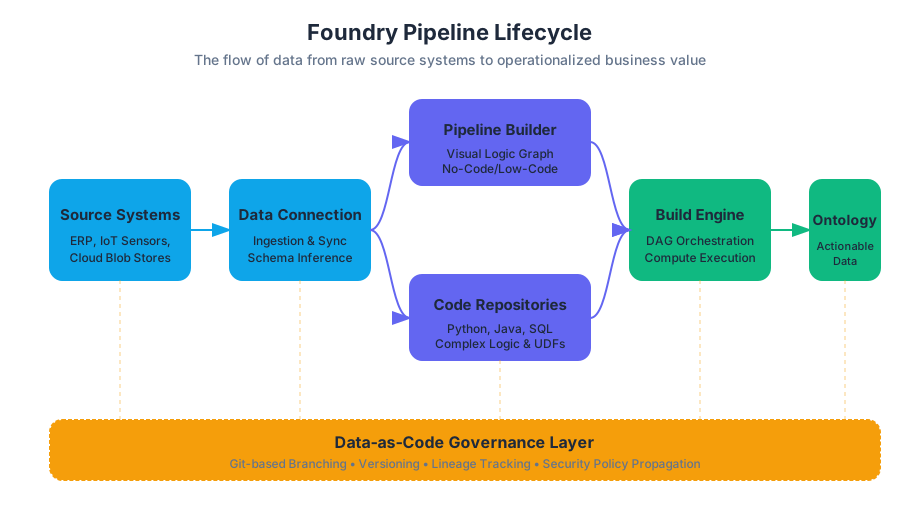
A pipeline is not merely a script; it is a managed, versioned, and governed flow of data. It represents a directed acyclic graph (DAG) where nodes represent datasets (or media sets and streams) and edges represent the transformations that derive one dataset from another. To build these pipelines, Foundry provides a dual-modality approach: Pipeline Builder for visual, high-velocity development, and Code Repositories for complex, programmatic logic.
AI_SVGI_SVGThe Infographic should depict the Foundry Pipeline Lifecycle: Source Systems → Data Connection (Ingestion) → Pipeline Builder/Code Repositories (Transformation) → Build Engine (Orchestration) → Ontology (Operationalization). It should highlight the "Data-as-Code" branching mechanism running parallel to this flow.*
Pipeline Builder: Visual Logic and No-Code Orchestration
Pipeline Builder is a primary interface for designing data flows through a visual, graph-based paradigm. It is designed to lower the barrier to entry for data engineers and analysts while maintaining the rigorous backend standards required for production-grade pipelines.
What it is
At its core, Pipeline Builder is a high-level abstraction over the underlying compute engine (typically Apache Spark). It allows users to define transformations—such as joins, filters, unions, and aggregations—using a point-and-click interface. These transformations are then compiled into a logical execution plan.
Why it matters
Traditional ETL tools often suffer from a "black box" problem where visual logic is difficult to version or audit. Pipeline Builder solves this by treating the visual graph as a first-class configuration object. It enables rapid prototyping without sacrificing the lineage, security, and scalability of code-based approaches.
How it works: The Transformation Graph
In Pipeline Builder, every operation is a node in a graph. When a user adds a "Join" step, they are defining a relationship between two input schemas. The system performs Schema Inference in real-time, allowing the user to see the resulting columns and data types before any compute is actually executed.
| Feature | Pipeline Builder | Code Repositories |
|---|---|---|
| Primary User | Data Analysts, Business Engineers | Data Engineers, Software Engineers |
| Logic Definition | Visual nodes and expressions | Python, Java, or SQL code |
| Complexity | Optimized for 80% of standard ETL | Optimized for complex, custom logic |
| Maintenance | High (Visual clarity) | High (Standard software patterns) |
| Performance | Auto-optimized Spark execution | Manually tunable Spark execution |
Common Pitfalls
A common mistake in Pipeline Builder is the "Mega-Pipeline" anti-pattern, where hundreds of transformations are crammed into a single builder resource. This can lead to slow UI performance and difficult debugging. The best practice is to modularize pipelines by breaking them into logical stages (e.g., Raw → Clean → Derived).
Code Repositories: Programmatic Data Engineering
For transformations that require complex branching logic, external libraries, or highly optimized Spark configurations, Code Repositories provide a full Integrated Development Environment (IDE) within the browser.
What it is
Code Repositories allow engineers to write data transformations using Software-Defined Data Integration (SDDI). It supports Python, Java, and SQL, providing a Git-based workflow for version control.
Why it matters
Code allows for abstractions that visual tools cannot easily replicate: loops, conditional logic, custom UDFs (User Defined Functions), and the use of specialized libraries (e.g., NumPy for numerical analysis or NLTK for natural language processing).
Implementation: The @transform Decorator
In Foundry's Python environment, the transforms library uses decorators to define the relationship between code and the data catalog. This is a critical departure from standard scripts; the code does not "fetch" data via a connection string. Instead, the infrastructure injects the dataset objects into the function based on the defined inputs.
from transforms.api import transform, Input, Output

@transform(
    # Define the input dataset by its absolute path in the Foundry Filesystem
    raw_data=Input("/Company/Data/Raw/Sales_Extract"),
    # Define where the output dataset will be saved
    cleaned_data=Output("/Company/Data/Clean/Sales_Cleaned"),
)
def my_compute_function(raw_data, cleaned_data):
    # Convert the input dataset wrapper into a PySpark DataFrame
    df = raw_data.dataframe()

    # Perform transformations using standard Spark DSL
    # Example: Filter out nulls and calculate a derived 'total_price' column
    df_filtered = df.filter(df.price.isNotNull())
    df_final = df_filtered.withColumn("total_price", df.price * df.quantity)

    # Write the resulting DataFrame to the output location
    cleaned_data.write_dataframe(df_final)
Mechanics of Execution
When this code is committed, Foundry's internal compiler analyzes the @transform decorator to update the Data Lineage. It understands exactly which datasets are inputs and outputs, allowing the Build Engine to orchestrate execution based on data staleness.
Builds and Jobs: The Execution Engine
A Build is the fundamental unit of computation in Foundry. It is the process of taking a set of instructions (from Pipeline Builder or Code Repositories) and executing them against a specific version of data.
What it is
A Build is a container for one or more Jobs. A Job is a single unit of work—typically the computation of one dataset.
The Build Lifecycle
- Submission: A user or schedule triggers a build on a "target" dataset.
- Build Resolution: The system analyzes the upstream dependencies. If a user requests a build on a "Final Report" dataset, Foundry checks if the "Cleaned Data" it depends on is up-to-date.
- JobSpec Generation: The code or visual logic is packaged into a
JobSpec—a static definition of the environment, resources (CPU/RAM), and logic required. - Execution: The job is sent to the compute cluster (Spark).
- Post-Processing: Upon success, the new data is committed as a new Transaction on the dataset, and the lineage is updated.
Job States
Monitoring builds requires understanding the state machine of a job:
| State | Description |
|---|---|
| PENDING | The job is in the queue, waiting for compute resources. |
| RUNNING | The Spark driver is active and executors are processing data. |
| SUCCEEDED | Data was written successfully and the transaction was committed. |
| FAILED | An error occurred (out of memory, code error, etc.). The transaction is aborted. |
| ABORTED | The job was manually cancelled by a user or system process. |
Staleness and Force Builds
Foundry uses a "Staleness" logic to save compute costs. If a dataset's inputs haven't changed since the last build, the system will mark the job as Up-to-Date and skip execution. A Force Build can be used to override this, re-running the logic regardless of input changes (useful for debugging or when logic has changed but inputs haven't).
AI_DEMOI_DEMOInteractive Simulation: A "Build Resolution" visualizer. Users can click a 'Target Dataset' in a mock DAG. The simulation highlights upstream nodes. If an upstream node is 'Dirty' (modified), the simulation shows the path the Build Engine must take to refresh the target. Users can toggle 'Force Build' to see how the resolution logic changes.*
Schedules: Automating the Flow
Data pipelines are rarely "one-and-done." To maintain a "digital twin" of an organization, data must be refreshed on a cadence. Schedules provide the automation layer for builds.
What it is
A schedule is a set of Triggers that define when a build should start. Triggers can be time-based (Cron) or event-based (e.g., "Run whenever Dataset X is updated").
Project-Scoped vs. User-Mode Permissions
This is a critical concept for production stability.
- User-Mode: The build runs with the permissions of the user who created the schedule. If that user leaves the company or loses access to a folder, the schedule fails.
- Project-Scoped: The build runs with the permissions of the Project itself. This ensures that the pipeline remains operational regardless of individual personnel changes, provided the Project has the necessary data access.
Schedule Trigger Types
| Trigger Type | Logic | Use Case |
|---|---|---|
| Time-based | 0 12 * * * (Every day at noon) |
Daily reporting, regulatory filings. |
| Data-update | Trigger when Input_A completes. |
Sequential pipelines where downstream relies on upstream. |
| Multi-trigger | Trigger when Input_A AND Input_B complete. |
Joining two disparate sources that land at different times. |
Branching: Data-as-Code
Foundry's most sophisticated feature is the application of Git-style branching to the data itself. This allows for safe, isolated experimentation.
What it is
In software, a branch is a pointer to a specific commit. In Foundry, a Dataset Branch is a pointer to a specific sequence of Transactions.
How it works: The Branching Theorem
When you create a branch (e.g., feature/new-logic) on a dataset, you are not copying the data. Instead, you are creating a new logical view.
- If you run a build on the
feature/new-logicbranch, the results are stored in a transaction isolated to that branch. - The
masterbranch remains untouched, ensuring that production dashboards and applications continue to see the "stable" data.
Fallback Branches
When a build runs on a branch, Foundry uses Fallback Logic. If a dataset does not have a version on the current branch, the system "falls back" to the master branch to find the data. This allows engineers to test a change to a single node in a 100-node pipeline without having to re-compute the other 99 nodes on their feature branch.
Definition: The Transaction Model Every update to a dataset in Foundry is a Transaction. Transactions are atomic (all-or-nothing), consistent, and isolated. Types include:
- SNAPSHOT: Replaces all existing data in the dataset.
- APPEND: Adds new files to the existing dataset.
- UPDATE/DELETE: (In Iceberg tables) Modifies specific rows.
Advanced Concept: Apache Iceberg and Interoperability
While traditional Foundry datasets are optimized for high-throughput batch processing, the introduction of Apache Iceberg support brings open-table format capabilities to the pipeline.
Why Iceberg?
Standard datasets are "file-based" wrappers. Iceberg tables provide a "table-based" abstraction that supports:
- Row-level edits: Efficiently
UPDATEorDELETEspecific records without rewriting the entire dataset. - Schema Evolution: Add, rename, or drop columns without breaking downstream dependencies.
- Hidden Partitioning: The system manages how data is laid out on disk, optimizing query performance automatically.
This is particularly relevant for pipelines handling GDPR "Right to be Forgotten" requests, where specific rows must be purged from historical records—a task that is computationally expensive in standard SNAPSHOT/APPEND models.
AI_FLASHCARDSI_FLASHCARDS Dataset: A wrapper around files in a backing store with schema and versioning.
- JobSpec: The static definition of a transformation unit, including code and environment.
- Build Resolution: The process of determining which upstream datasets need to be computed to satisfy a build request.
- Project-Scoped Permissions: A security setting for schedules that ensures builds run using the Project's access rights rather than an individual's.
- Fallback Branch: The mechanism that allows a branch to read data from 'master' if no branch-specific version exists.
- Staleness: The state of a dataset when its logic or inputs have changed since its last successful build.
- Transaction: An atomic unit of change to a dataset (SNAPSHOT, APPEND, etc.).
AI_QUIZI_QUIZ. Scenario: You have a pipeline where Dataset C depends on Dataset B, which depends on Dataset A. You change the code for Dataset B and trigger a build on Dataset C. What does the Build Resolution engine do?
- (A) Only runs
Dataset C. - (B) Runs
Dataset B, thenDataset C. - (C) Fails because
Dataset Bis now "dirty". - (D) Runs
A,B, andCin sequence. Answer: (B). The engine detects that the logic for B has changed (making it stale) and realizes C depends on B, so it orchestrates both.
-
True/False: Creating a new branch on a 10-terabyte dataset immediately doubles the storage cost. Answer: False. Branching is a logical operation; no data is copied until a new transaction is committed to the new branch.
-
Which schedule trigger is best for a pipeline that must incorporate data from three different source systems that arrive at unpredictable times?
- (A) A Cron trigger running every hour.
- (B) A single data-update trigger on the first source.
- (C) A multi-trigger requiring all three source datasets to update.
- (D) A manual build triggered by an admin. Answer: (C). This ensures the join logic has all necessary inputs before consuming compute resources.
AI_STUDY_GUIDEI_STUDY_GUIDE*Key Learning Objectives:**
- Differentiate between visual and code-based transformations: Understand when to use Pipeline Builder (speed, clarity) vs. Code Repositories (complexity, custom libraries).
- Master the Build Lifecycle: Be able to explain how Foundry moves from a code commit to a successful data transaction, including the role of the JobSpec and Spark.
- Implement Robust Automation: Understand the importance of Project-scoped permissions in Schedules to prevent production outages.
- Leverage Branching for Safety: Apply "Data-as-Code" principles to test pipeline changes in isolation using fallback logic.
- Understand Data Representation: Contrast standard Datasets (file-based) with Streams (low-latency) and Iceberg Tables (row-level operations).
Further Reading:
- Study the
transforms-pythonlibrary documentation for advanced@transformconfigurations (e.g.,indexes,credentials). - Explore the Data Health application to learn how to attach "Freshness" and "Check" constraints to your pipeline nodes.
- Review the Data Lineage graph to visualize how complex dependencies propagate through the Foundry filesystem.
Real-time Data Processing with Flink
Key concepts: Apache Flink · Foundry Streams · Hot and Cold Storage · Exactly-Once Semantics · Streaming Profiles
Deep dive into Foundry's streaming architecture, powered by Apache Flink, for low-latency data processing.
Real-time Data Processing with Flink
In the landscape of modern data engineering, the transition from batch-oriented processing to real-time stream processing represents a fundamental shift in how organizations derive value from information. Within the Foundry ecosystem, real-time data processing is powered by Apache Flink, integrated through a specialized abstraction known as Foundry Streams. This architecture allows for the seamless ingestion, transformation, and persistence of unbounded data—data that is produced continuously and lacks a discrete end.
Unlike traditional Extract-Transform-Load (ETL) workflows that operate on static snapshots of data, streaming in Foundry enables sub-second latency for critical operational workflows. By leveraging Flink’s stateful computation capabilities, Foundry provides a robust framework for complex event processing, windowed aggregations, and exactly-once consistency guarantees, all while maintaining the strict data lineage and security protocols inherent to the platform.
AI_SVGI_SVG--
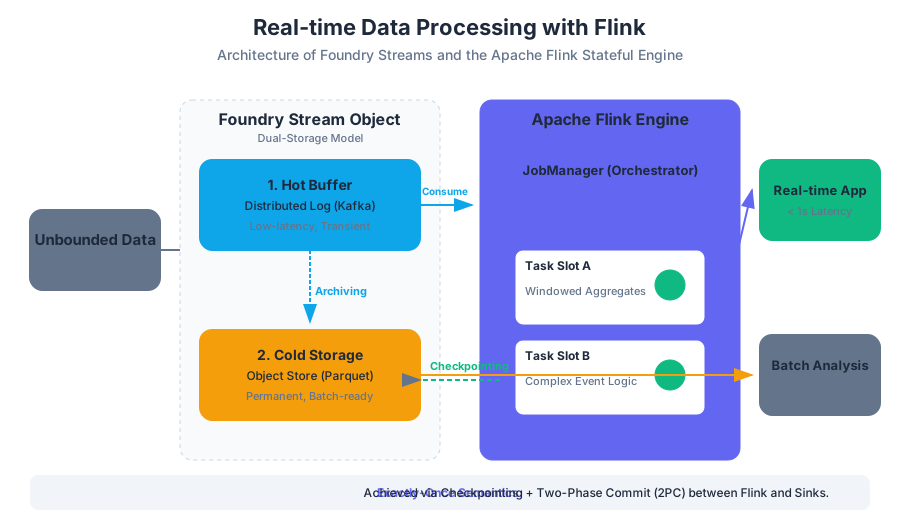
The Architecture of Foundry Streams: Dual-Storage Model
At the core of Foundry’s streaming capability is the Foundry Stream, a specialized data object designed to handle the unique requirements of real-time data. While a standard dataset is optimized for high-throughput batch reads and writes, a stream must balance low-latency access with long-term durability.
To achieve this, Foundry employs a Dual-Storage Model. This architecture decouples the immediate consumption of data from its long-term archival, ensuring that real-time applications are not bottlenecked by the overhead of persistent storage.
1. The Hot Buffer
The Hot Buffer is the high-performance tier of a stream. It is typically backed by a distributed messaging system (such as Kafka) and is optimized for low-latency writes and sequential reads.
- Purpose: To provide immediate access to incoming data for downstream Flink jobs.
- Retention: Data in the hot buffer is transient. It is retained based on a configurable time-based or size-based policy (e.g., 7 days or 100GB).
- Latency: Sub-second.
2. Cold Storage
Cold Storage acts as the permanent record of the stream. As data flows through the hot buffer, it is periodically archived into a persistent filesystem (like S3 or ADLS) in a format compatible with standard Foundry datasets (e.g., Parquet).
- Purpose: To enable historical analysis, batch integration, and stream "replays."
- Retention: Indefinite (governed by dataset retention policies).
- Integration: Allows streaming data to be joined with massive batch datasets using Spark or Pipeline Builder.
| Feature | Hot Buffer | Cold Storage |
|---|---|---|
| Primary Goal | Low-latency processing | Long-term persistence & Batch access |
| Storage Technology | Distributed Log (e.g., Kafka) | Object Store (e.g., S3/Parquet) |
| Access Pattern | Sequential, Real-time | Random/Batch, Historical |
| Data Lifecycle | Transient (TTL-based) | Permanent (Transaction-based) |
| Typical Latency | < 100ms | Seconds to Minutes (Archiving lag) |
Apache Flink: The Engine of Stateful Computation
Foundry utilizes Apache Flink as its primary distributed compute engine for streaming. Flink is distinguished by its ability to perform stateful operations on unbounded streams. In a stateless operation (like a simple filter), each record is processed independently. In a stateful operation (like a running total or a windowed average), the system must "remember" information across multiple records.
Distributed Runtime Architecture
The Flink runtime consists of two primary components:
- JobManager: The orchestrator. It manages the execution graph, coordinates checkpoints, and handles failure recovery.
- TaskManagers: The workers. They execute the actual data processing tasks (sub-tasks) and store the managed state.
Managed State and Checkpointing
One of Flink's most critical features is its Checkpointing mechanism, based on the Chandy-Lamport algorithm. Checkpoints are consistent, distributed snapshots of the state of all operators in a streaming job.
Definition: Managed State Managed State refers to the internal data structures maintained by Flink operators (e.g., the contents of a sliding window or the current value of a counter). This state is partitioned across TaskManagers and is backed up to persistent storage during a checkpoint to ensure fault tolerance.
If a TaskManager fails, the JobManager restarts the failed tasks and restores their state from the last successful checkpoint, allowing the stream to resume exactly where it left off.
Consistency Guarantees: Exactly-Once vs. At-Least-Once
In distributed streaming, the "consistency guarantee" defines how the system handles potential failures and retries. Choosing the right semantic is a trade-off between absolute data integrity and system throughput.
Exactly-Once Semantics
Exactly-Once ensures that even if a failure occurs, the final result reflects each input record exactly once. It does not mean that a record is processed only once (it might be re-processed during recovery), but rather that the effects of the processing—the state updates and the output—are idempotent.
- Mechanism: Achieved through a combination of Flink's checkpointing and a Two-Phase Commit (2PC) protocol with the sink (output) system.
- Use Case: Financial transactions, billing, and regulatory reporting where duplicates are unacceptable.
At-Least-Once Semantics
At-Least-Once ensures that no data is lost, but in the event of a failure, some records might be processed and written to the output more than once.
- Mechanism: The system acknowledges records only after they are successfully processed, but does not perform the complex coordination required for exactly-once.
- Use Case: Real-time dashboards, log monitoring, or IoT sensor telemetry where a slight over-count is preferable to the latency overhead of 2PC.
| Metric | At-Least-Once | Exactly-Once |
|---|---|---|
| Data Integrity | Potential duplicates | No duplicates, no loss |
| Throughput | High | Moderate (due to 2PC overhead) |
| Latency | Low | Slightly higher (checkpoint alignment) |
| Complexity | Low | High (requires idempotent sinks) |
Streaming Ingestion: Syncs and Proxies
Before data can be processed by Flink, it must be ingested into Foundry. Foundry provides two primary patterns for streaming ingestion via the Data Connection application.
1. Streaming Syncs (Pull Model)
In a pull model, a Foundry Agent connects to an external source (e.g., an on-premise Kafka cluster, an MQTT broker, or an AWS Kinesis stream) and fetches data.
- Pros: Foundry controls the rate of ingestion (backpressure handling); easier to secure within firewalls.
- Cons: Requires an active agent connection to the source.
2. Stream Proxy (Push Model)
The Stream Proxy provides an endpoint (often S3-compatible or via a REST API) where external systems can "push" data directly into Foundry.
- Pros: Ideal for cloud-native sources or third-party providers that cannot be reached by an agent.
- Cons: Requires the source system to manage retry logic and authentication.
Software-Defined Data Integration (SDDI)
Foundry leverages SDDI to automate the creation of these syncs. For complex sources like SAP or large-scale IoT platforms, SDDI can automatically generate the necessary streaming schemas and sync configurations based on the source's metadata.
Implementation: Flink SQL and Pipeline Builder
Foundry abstracts much of the Flink complexity through Pipeline Builder, a visual interface for constructing streaming logic. However, for advanced users, Flink SQL provides a powerful declarative language for expressing complex streaming transformations.
Example: Windowed Aggregation
A common streaming requirement is to calculate metrics over a specific time window. For instance, calculating the average temperature of a sensor every 5 minutes using a Tumbling Window.
-- Flink SQL example for a tumbling window aggregation
SELECT
    sensor_id,
    TUMBLE_START(event_time, INTERVAL '5' MINUTE) as window_start,
    TUMBLE_END(event_time, INTERVAL '5' MINUTE) as window_end,
    AVG(temperature) as avg_temp
FROM
    sensor_stream
GROUP BY
    sensor_id,
    TUMBLE(event_time, INTERVAL '5' MINUTE);
In this example:
event_timeis the Event Time (when the reading actually happened), not the Processing Time (when the data reached Flink).- Flink handles Watermarks, which are markers in the data stream that signal the progress of event time, allowing the system to handle late-arriving data.
AI_DEMOI_DEMO--
Streaming Profiles and Resource Management
Streaming jobs are long-running processes. Unlike batch jobs that spin up, execute, and shut down, a Flink job stays active indefinitely. To manage the resources allocated to these jobs, Foundry uses Streaming Profiles.
A Streaming Profile defines the hardware and runtime characteristics of the Flink cluster:
- Parallelism: The number of parallel instances of a task. Higher parallelism increases throughput but consumes more CPU/Memory.
- Task Slots: The number of slots per TaskManager.
- Memory Allocation: Specifically, the division between Heap memory (for objects) and Managed memory (for Flink's internal state and buffering).
| Profile Type | Use Case | Parallelism | Memory Config |
|---|---|---|---|
| Low Latency | Critical alerts, fast triggers | Low | High Heap, Low Managed |
| High Throughput | Bulk ingestion, log processing | High | Balanced |
| State Heavy | Large joins, long windows (e.g., 24h) | Moderate | High Managed (RocksDB state backend) |
Monitoring and Operational Health
Because streaming pipelines are "always on," monitoring is critical. Foundry provides integrated health checks and real-time metrics for every stream.
Key Metrics to Monitor:
- Ingestion Rate: Records per second entering the stream.
- Consumer Lag: The delay between the latest record in the source and the latest record processed by Flink. High lag indicates the job is under-provisioned.
- Checkpoint Success Rate: If checkpoints fail consistently, the job cannot recover from failures and state may be lost.
- Backpressure: A signal that downstream operators cannot keep up with upstream operators, causing the entire pipeline to slow down.
The "Reset Stream" Action
During development, schemas often change. The Reset Stream action allows developers to wipe the data in the hot buffer and cold storage and restart the stream from scratch.
Warning: Resetting a stream is irreversible. In production, this should be avoided as it breaks downstream lineage and deletes historical data that may not be recoverable from the source.
Common Pitfalls and Best Practices
- Ignoring Event Time Skew: If your watermarks are too aggressive, Flink will drop "late" data. Always analyze the maximum expected delay in your source data before configuring watermark strategies.
- Small File Problem in Cold Storage: If the archiving frequency is too high, you will end up with thousands of tiny files in cold storage, which degrades batch performance. Balance the
target_file_sizewith thearchiving_interval. - State Bloat: Using very long windows (e.g., a 30-day moving average) without sufficient managed memory will cause TaskManagers to crash with
OutOfMemoryerrors. For long-duration state, use the RocksDB state backend. - Unbounded State: Avoid joins between two unbounded streams without a join condition that limits the time range (e.g., an interval join). Without a time limit, Flink must keep every record from both streams in state forever.
Summary of Data Processing Paradigms in Foundry
To choose the right tool, it is essential to compare Flink-based streaming with other Foundry compute modes.
| Feature | Batch (Spark) | Incremental (Spark) | Streaming (Flink) |
|---|---|---|---|
| Data Boundary | Bounded (Snapshot) | Bounded (New files only) | Unbounded (Continuous) |
| Latency | Minutes to Hours | Minutes | Sub-second |
| State Management | None (Stateless) | Limited (Previous state) | Rich (Managed State) |
| Cost Model | Pay per build | Pay per build | Continuous (Always on) |
| Primary Tool | Code Repositories | Pipeline Builder | Pipeline Builder / Flink SQL |
Pipeline Reliability and Health
Key concepts: Health Checks · Data Quality · Staleness · Stream Monitoring
Ensuring the long-term stability of data pipelines through health checks, monitoring, and governance.
Pipeline Reliability and Health
In the ecosystem of modern data engineering, the transition from a "working" pipeline to a "production-ready" pipeline is defined by its reliability and health monitoring. Within Palantir Foundry, data connectivity and integration are not merely about moving bytes from a source to a destination; they are about establishing a Software-Defined Data Integration (SDDI) framework where data is treated with the same rigor as source code.
Pipeline reliability ensures that the "objective reality" represented in the platform is accurate, timely, and governed. This requires a multi-layered approach involving automated health checks, sophisticated staleness detection, and real-time stream monitoring.
AI_SVGI_SVGThe Reliability Hierarchy: From raw connectivity and transaction management to automated health checks and semantic data quality validation.*
The Sentinel Layer: Health Checks
Health Checks are automated monitors that validate the state of a dataset or the performance of a job. Unlike unit tests, which validate code logic in isolation, health checks validate the state of the data in the production environment. They act as the first line of defense against "silent failures"—scenarios where a build succeeds technically (exit code 0) but the resulting data is logically corrupt or dangerously outdated.
Categories of Health Checks
Foundry categorizes health checks based on the level of the stack they monitor. Understanding these distinctions is critical for architecting resilient pipelines.
| Check Category | Focus Area | Example Metric | Business Impact |
|---|---|---|---|
| Job-level | Execution success | Success/Failure rate | Ensures the compute resources were allocated and completed. |
| Build-level | Orchestration timing | Build duration (P95) | Detects performance regressions or resource contention. |
| Freshness (Staleness) | Temporal relevance | Time since last transaction | Prevents decision-making based on outdated information. |
| Data Quality | Semantic integrity | Null counts, range checks, schema drift | Ensures the data is fit for purpose (e.g., no negative prices). |
| Stream Health | Real-time throughput | Consumer lag, records/sec | Monitors the "liveness" of real-time operational flows. |
Mechanics of Freshness Checks
The Freshness Check is perhaps the most vital for operational workflows. It measures the delta between the current time ($T_{now}$) and the timestamp of the most recent successful transaction ($T_{trans}$).
Definition: Freshness Threshold A dataset $D$ is considered "Healthy" if $(T_{now} - T_{trans}) < \tau$, where $\tau$ is the user-defined maximum allowable latency. If the delta exceeds $\tau$, the check enters a "Failing" state, often triggering alerts to the pipeline owner.
Common Pitfalls in Health Check Configuration
- Over-alerting (Alert Fatigue): Setting thresholds too tightly on volatile sources leads to engineers ignoring notifications.
- Checking the Wrong Branch: Health checks should typically be configured on the
masterbranch. Checks on development branches can lead to false positives during experimentation. - Ignoring Upstream Dependencies: A dataset may be "fresh" (it was built recently) but contain "stale" data because its upstream source failed to update. This is why Build Resolution is critical.
Staleness and the Build Resolution Engine
In Foundry, Staleness is a formal state where a dataset’s current version does not reflect the most recent available data from its inputs. The platform’s build system uses a directed acyclic graph (DAG) to resolve these dependencies.
The Logic of Build Resolution
When a build is triggered, the Build Coordinator performs a resolution step. It compares the transaction ID of the current dataset with the transaction IDs of all its parent datasets.
- Staleness Detection: If any parent dataset has a transaction ID newer than the one used to create the current child dataset, the child is marked as stale.
- Force Builds: In some cases, a user may trigger a "Force Build." This bypasses staleness detection and re-runs the computation regardless of whether the inputs have changed. This is often used to recover from transient failures or to apply updated logic to existing data.
- JobSpecs: Every build is governed by a
JobSpec, which defines the transformation logic, the required inputs, and the output destination. TheJobSpecensures that the build is reproducible and consistent.
Transaction Types and Reliability
The way data is written to a dataset significantly impacts how staleness and reliability are managed.
| Transaction Type | Mechanism | Impact on Staleness |
|---|---|---|
| SNAPSHOT | Overwrites all existing data with the new batch. | Resets the staleness of all downstream consumers entirely. |
| APPEND | Adds new files to the dataset without removing old ones. | Downstream consumers must be designed to handle incremental updates to remain "fresh." |
| UPDATE | Modifies specific records (common in Iceberg tables). | Requires downstream logic to handle row-level changes, often via Change Data Capture (CDC). |
| DELETE | Removes specific files or records. | Essential for GDPR/CCPA compliance and maintaining "clean" production states. |
Data Quality Validation: Beyond Technical Success
Technical success (a green build) does not guarantee data quality. High-reliability pipelines implement Data Quality (DQ) Validation as an integrated step within the transformation logic.
Implementation Pattern: The "Check-and-Publish" Workflow
A robust pattern involves writing data to a "staging" branch or a temporary hidden transaction, running validation logic, and only committing the transaction to the master branch if the validation passes.
from transforms.api import transform, Input, Output
from foundry_checks import check, GreaterThan

@transform(
    output=Output("/Company/Production/Clean_Orders"),
    source_data=Input("/Company/Raw/Daily_Orders")
)
def validate_orders(source_data, output):
    df = source_data.dataframe()

    # 1. Technical Validation: Schema Check
    # Foundry handles basic schema enforcement, but we can add logic here.

    # 2. Semantic Validation: Business Logic
    # Ensure order_amount is always positive
    invalid_count = df.filter(df['order_amount'] <= 0).count()

    # 3. Conditional Commit
    if invalid_count == 0:
        output.write_dataframe(df)
    else:
        # Log the error and raise an exception to fail the build
        raise ValueError(f"Data Quality Failure: Found {invalid_count} negative order amounts.")
HyperAuto and Automated Reliability
For large-scale integrations, HyperAuto automates the creation of these pipelines. It uses metadata from source systems (like SAP or Salesforce) to automatically generate the JobSpecs, schemas, and initial health checks. This reduces human error in the "plumbing" of the pipeline, allowing engineers to focus on complex business logic.
Stream Monitoring: Managing High-Velocity Data
Foundry Streams provide low-latency data processing, but they introduce unique reliability challenges compared to batch pipelines. Streams utilize a dual-storage model: a Hot Buffer for immediate consumption and Cold Storage for long-term persistence and batch integration.
Consistency Semantics
Reliability in streaming is often defined by its delivery guarantees.
- At-Least-Once: Ensures no data is lost, but may result in duplicate records if a system fails and restarts. The pipeline must be idempotent (processing the same record twice has no additional effect).
- Exactly-Once: Uses Checkpointing to ensure that each record is processed exactly one time. This provides the highest reliability but often incurs a performance penalty due to the overhead of managing state.
Monitoring Metrics for Streams
Monitoring a stream requires looking at "Liveness" and "Throughput" rather than just "Success/Failure."
- Consumer Lag: The delta between the latest record produced at the source and the latest record processed by the consumer. High lag indicates the pipeline is under-provisioned.
- Backpressure: A signal that the downstream system cannot keep up with the ingestion rate, causing the stream to slow down ingestion to prevent a crash.
- Serialization Errors: Occur when a message in the stream does not match the expected schema. High-reliability streams use a "Dead Letter Office" (DLO) pattern to divert these records for manual inspection without stopping the entire flow.
Advanced Reliability: CDC, Iceberg, and Virtual Tables
As data integration matures, new patterns like Change Data Capture (CDC) and Iceberg Tables provide more granular control over reliability.
Change Data Capture (CDC)
CDC is used to sync relational databases in real-time. It relies on three critical metadata columns to ensure reliability:
- Primary Key: To identify which record is being updated.
- Ordering Column: (e.g., a
sys_updated_attimestamp) to ensure that if updates arrive out of order, the platform can resolve to the "latest" state. - Deletion Flag: To handle records removed from the source system.
Apache Iceberg Tables (Beta)
Iceberg support in Foundry introduces Row-level edits and Schema Evolution. In traditional Parquet-based datasets, changing a schema or deleting a single row requires rewriting large files. Iceberg allows for:
- ACID Transactions: Ensuring that complex updates are atomic.
- Time Travel: Allowing users to query previous "snapshots" of a table, which is invaluable for debugging when a pipeline health check fails.
Virtual Tables
Virtual Tables act as pointers to external systems (e.g., Snowflake, BigQuery). While they reduce the need for data movement, they shift the reliability burden to the source system.
- Compute Pushdown: The reliability of a Virtual Table query depends on the source system's ability to handle the compute load.
- Update Detection: Foundry periodically polls the external source to detect changes, ensuring the Virtual Table remains a reliable "view" of the external data.
Common Pitfalls and Exam Patterns
When evaluating pipeline health in a professional context or exam scenario, look for these common patterns:
- The "Stale Master" Problem:
- Scenario: A user updates code on a branch, merges it to
master, but the dataset doesn't change. - Reason: Merging code only updates the
JobSpec. A Build must be triggered (manually or via a schedule) to execute the new logic and update the data.
- Scenario: A user updates code on a branch, merges it to
- The "Hidden Dependency" Failure:
- Scenario: A build fails because an upstream dataset is missing a schema, even though the upstream build "Succeeded."
- Reason: The upstream build may have written files but failed to register the schema. Reliability requires both data and metadata (schema) to be valid.
- Schedule Misconfiguration:
- Scenario: A schedule is set to "Trigger on Update," but it runs constantly in a loop.
- Reason: This often happens when two datasets are configured to update each other, or when a schedule is triggered by a dataset that is updated by a high-frequency stream.
AI_FLASHCARDSI_FLASHCARDS Health Check: An automated monitor that validates job success, build duration, or data quality.
- Staleness: A state where a dataset is out of sync with its parent datasets' latest transactions.
- SNAPSHOT Transaction: A transaction type that replaces the entire content of a dataset.
- APPEND Transaction: A transaction type that adds new data to a dataset without removing existing records.
- Consumer Lag: The delay between data being written to a stream and being processed by a downstream job.
- Idempotency: The property where an operation can be applied multiple times without changing the result beyond the initial application.
- JobSpec: The definition of a job, including its logic, inputs, and outputs.
- Build Resolution: The process of determining which datasets need to be recomputed based on staleness and dependencies.
- Cold Storage: The persistent storage layer for streams used for long-term archiving and batch access.
- Checkpointing: A mechanism in streaming to record the state of a consumer to ensure exactly-once or at-least-once processing.
AI_QUIZI_QUIZ. Which transaction type is most likely to cause a "Staleness" alert in a downstream dataset if the upstream is updated frequently?
- A) SNAPSHOT
- B) APPEND
- C) UPDATE
- D) All transaction types trigger staleness detection equally.
- Answer: D. Staleness is based on Transaction IDs; any new transaction in a parent makes the child stale.
-
A pipeline engineer notices that a streaming job has high "Consumer Lag." What is the most effective first step to address this?
- A) Change the consistency model from Exactly-Once to At-Least-Once.
- B) Increase the compute resources (vCPUs/Memory) allocated to the streaming job.
- C) Switch the dataset from a Stream to a Batch dataset.
- D) Delete the checkpoints and restart the stream.
- Answer: B. High lag usually indicates the consumer cannot keep up with the ingestion rate.
-
What is the primary difference between a Job-level health check and a Data Quality health check?
- A) Job-level checks monitor the code; DQ checks monitor the hardware.
- B) Job-level checks monitor execution success; DQ checks monitor the semantic content of the data.
- C) Job-level checks are only for batch; DQ checks are only for streaming.
- D) There is no difference; they are synonyms.
- Answer: B. Job-level is about the "process," DQ is about the "product."
-
In the context of Build Resolution, what does a "Force Build" do?
- A) It deletes all data in the dataset before running.
- B) It ignores the JobSpec and runs the raw code.
- C) It re-computes the dataset even if the system determines it is not stale.
- D) It forces the source system to provide new data.
- Answer: C. Force builds bypass the staleness check.
AI_STUDY_GUIDEI_STUDY_GUIDE*Key Objectives for Mastery:**
- Differentiate Monitoring Types: Be able to explain when to use a Job-level check vs. a Freshness check.
- Understand the Build Lifecycle: Trace a build from
Trigger->Resolution->JobSpec Execution->Transaction Commit. - Stream Reliability: Explain the trade-offs between "Hot" and "Cold" storage and how checkpointing ensures data integrity.
- Data Quality Patterns: Memorize the "Check-and-Publish" workflow and how it prevents corrupt data from reaching production.
- Architectural Components: Identify the roles of HyperAuto, CDC, and Iceberg in building modern, reliable integration pipelines.
- Troubleshooting: Practice diagnosing common failure modes like schema drift, consumer lag, and alert fatigue.
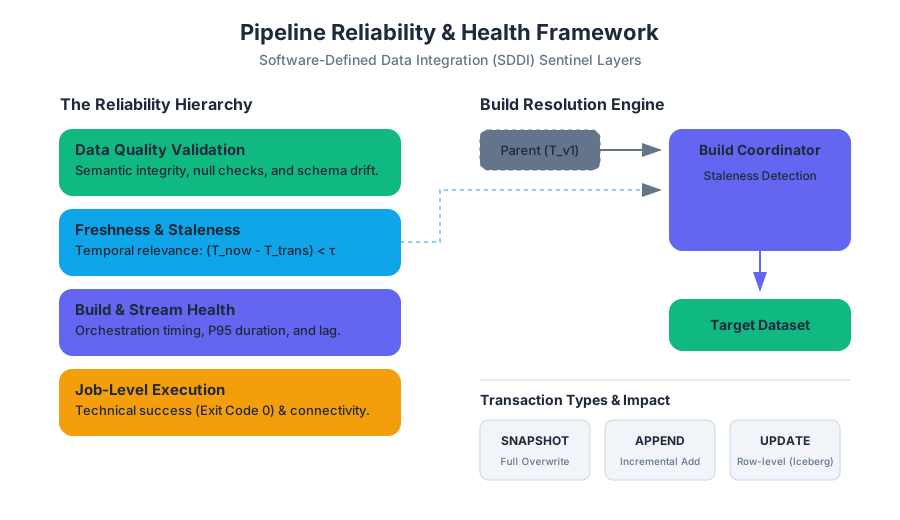
Source Materials
Study Data connectivity and integration with AI — Free on Lykke
Sign up for free to generate personalized flashcards, quizzes, and study guides from this course. Chat with an AI tutor that knows the material.
Get Started FreeView this course wiki on Lykke · Browse all public course wikis