AI FDE
Institution: MIT
5 study materials · 5 sections
AI FDE (AI-powered Forward Deployed Engineer) is an interactive agent within Palantir's AIP designed to translate natural language commands into complex Foundry operations. It functions as a closed-loop system that executes data transformations, manages ontologies, and handles filesystem tasks while adhering to strict security protocols. By utilizing specialized modes and skills, the agent provides a focused environment for developers to automate workflows and manage data infrastructure. This course covers the fundamental mechanics, navigation, security framework, and best practices for deploying AI FDE effectively.
Course Sections
Introduction to AI FDE
Key concepts: AI Forward Deployed Engineer (AI FDE) · Natural Language Processing · Closed-loop operation · Foundry Operations
An introduction to the AI Forward Deployed Engineer, its core functions, and the closed-loop system architecture.
Introduction to AI FDE
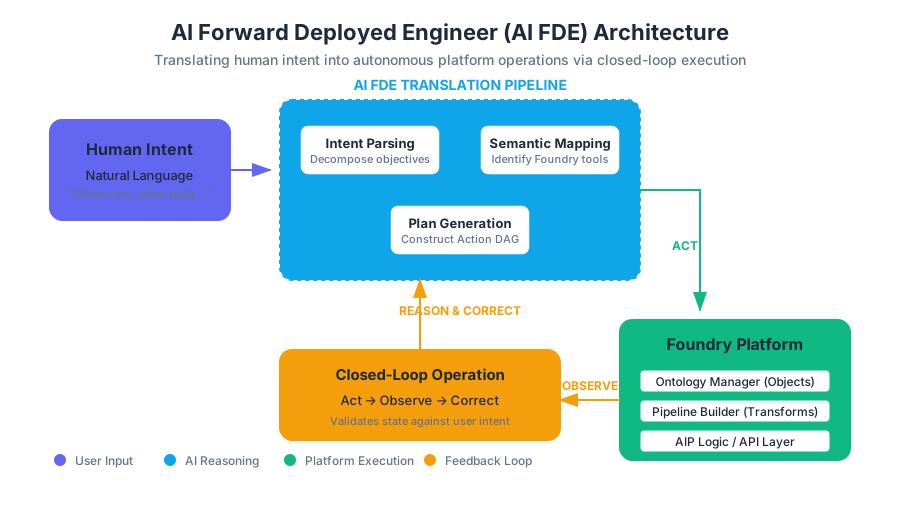
The AI Forward Deployed Engineer (AI FDE) represents a paradigm shift in how complex data ecosystems are managed and manipulated. Historically, operating a platform as robust as Palantir Foundry required significant specialized knowledge—proficiency in Spark, SQL, Java/TypeScript, and a deep understanding of the platform's proprietary Ontology and data integration frameworks. The AI FDE is an interactive agent within Palantir’s Artificial Intelligence Platform (AIP) that bridges the gap between high-level human intent and low-level technical execution.
By leveraging advanced Natural Language Processing (NLP) and a Closed-loop operation model, the AI FDE functions as a digital counterpart to the human Forward Deployed Engineer. It does not merely provide suggestions or generate boilerplate code; it actively operates the Foundry environment, performing data transformations, managing the Ontology, and orchestrating complex data pipelines through conversational commands.
AI_SVGI_SVG## The Core Concept: What is an AI FDE?
At its most fundamental level, the AI Forward Deployed Engineer (AI FDE) is an autonomous agent designed to navigate, modify, and optimize the Foundry environment. Unlike a standard chatbot that provides information, the AI FDE is "action-oriented." It possesses "hands" in the form of API integrations and toolsets that allow it to interact with the platform’s underlying services.
Definition: The AI FDE is a generative AI agent that translates natural language prompts into a sequence of executable Foundry operations, maintaining a persistent state across a session to achieve complex engineering goals.
Why It Matters: The Engineering Bottleneck
The motivation for the AI FDE stems from the "engineering bottleneck." In large enterprises, the ratio of data consumers to data engineers is often skewed. Business users may know what they want to achieve (e.g., "Calculate the 30-day rolling average of sensor failures across all offshore rigs"), but they lack the technical syntax to implement it. Traditionally, this required a human FDE to translate the business logic into a Pipeline Builder graph or a Python transform. The AI FDE automates this translation layer, allowing for rapid prototyping and deployment while maintaining the rigorous governance standards required by enterprise data.
| Feature | Traditional Manual Operation | AI FDE Operation |
|---|---|---|
| Interface | GUI-based / Code-based (IDE) | Natural Language / Conversational |
| Execution | Manual step-by-step configuration | Automated multi-step execution plans |
| Validation | Human-led testing and debugging | Automated closed-loop validation |
| Speed | Minutes to hours per task | Seconds to minutes per task |
| Governance | Manual audit trails | Automated, user-attributed logging |
Mechanics of Operation: NLP and Translation
The "brain" of the AI FDE is powered by Large Language Models (LLMs) specifically tuned for the Foundry ecosystem. This involves a sophisticated application of Natural Language Processing (NLP) where the agent must map ambiguous human language to a strictly defined set of platform capabilities.
How it Works: The Translation Pipeline
- Intent Parsing: The agent decomposes a user's request into a set of discrete objectives.
- Semantic Mapping: It identifies which Foundry tools (e.g., Ontology Manager, Pipeline Builder, Data Health) are required.
- Plan Generation: The agent constructs a logical sequence of actions, often represented internally as a Directed Acyclic Graph (DAG) of tool calls.
- Parameterization: It extracts specific variables from the conversation (e.g., dataset names, column headers, filter criteria) to populate the tool arguments.
Concrete Example: Data Transformation
If a user says, "Clean the 'raw_sales' dataset by removing nulls in the 'price' column and join it with the 'product_dim' table," the AI FDE does not just write the code. It:
- Identifies the
raw_salesandproduct_dimresources. - Selects the appropriate transformation engine (e.g., Pipeline Builder).
- Generates a plan to add a "Filter" node and a "Join" node.
- Executes these steps within the user's session context.
Closed-loop Operation: The "Act-Observe-Correct" Cycle
A critical differentiator of the AI FDE is its Closed-loop operation. Most AI assistants operate in an "open-loop" fashion: the user asks a question, the AI provides an answer, and the process ends. If the answer is wrong, the user must manually intervene.
In contrast, the AI FDE operates within a feedback loop. It executes an action, observes the platform's response (including error messages or data previews), and validates whether the outcome matches the user's intent.
The Loop Mechanism
- Action: The agent calls a Foundry API (e.g.,
create_ontology_object_type). - Observation: The agent receives the result (e.g.,
SuccessorError: Object type already exists). - Reasoning: If an error occurs, the agent analyzes the message.
- Correction: The agent modifies its plan (e.g., "The object exists, I will update it instead of creating it") and tries again.
Key Insight: Closed-loop operation reduces the "hallucination" risk common in LLMs. By grounding the agent's actions in real-time system feedback, the AI FDE ensures that the final state of the platform is consistent and functional.
AI_DEMOI_DEMO--
Context Management and Session State
For an AI agent to be effective, it must understand the "where" and "what" of its current environment. This is handled through Context Management. In AI FDE, context is not just the chat history; it is the set of resources, permissions, and metadata currently "in view" of the agent.
Modes and Skills
To prevent the agent from being overwhelmed by the thousands of possible tools in Foundry, AI FDE utilizes Modes and Skills.
- Modes: These define the broad task context. For example, an "Ontology Editing" mode focuses the agent's attention on object types, link types, and action types, loading the relevant documentation and toolsets for that domain.
- Skills: These are granular capabilities. A "Data Integration" skill might include the ability to preview a dataset or create a schedule, while a "General Reasoning" skill allows the agent to synthesize information across different modes.
Context Management Parameters
| Parameter | Description | Impact on Performance |
|---|---|---|
| Resource Selection | The specific datasets/objects the agent can "see." | Reduces token usage and prevents cross-contamination of logic. |
| Token Limit | The maximum size of the conversation and metadata history. | High limits allow for complex history; low limits improve speed. |
| Active Mode | The current functional domain (e.g., Data Integration). | Improves accuracy by narrowing the tool-search space. |
| Chat Outline | A summary of the session's progress and state. | Helps the agent (and user) track long-running multi-step tasks. |
Security and Governance: Operating Under Identity
A common concern with AI agents in enterprise environments is the "Service Account Problem"—where an agent has broad, unmonitored access to data. AI FDE solves this by operating entirely under the User's Identity and Permissions.
The Security Model
- User Attribution: Every action taken by the AI FDE is logged as being performed by the human user. If the AI FDE deletes a dataset, the audit log shows "User X (via AI FDE) deleted dataset Y."
- Permission Parity: The AI FDE cannot see or touch any data that the human user does not have access to. It respects all Mandatory Controls, Markings, and Roles defined in Foundry.
- Tool Approval System: For sensitive operations (e.g., deleting a production pipeline or modifying a critical Ontology object), the AI FDE is configured to require explicit human approval. The agent presents a "Plan" to the user, and execution only proceeds once the user clicks "Approve."
Governance Controls
| Control Type | Mechanism | Purpose |
|---|---|---|
| Audit Logging | Full trace of LLM prompts and tool calls. | Compliance, troubleshooting, and forensic analysis. |
| LLM Tracking | Monitoring of token consumption and costs. | Budget management and resource optimization. |
| Tool Configuration | Restricting which tools the agent can access. | Preventing the agent from performing unauthorized types of actions. |
Operational Workflows: Data Integration and Ontology Editing
The AI FDE is most powerful when applied to the two pillars of Palantir Foundry: Data Integration and the Ontology.
Data Integration (DI)
In the DI workflow, the AI FDE acts as a pipeline architect. It can:
- Inspect Schema: Analyze the structure of raw data.
- Generate Transformations: Write the logic to clean, join, and aggregate data.
- Manage Health: Set up data health checks and monitors to ensure pipeline reliability.
- Optimization: Suggest more efficient ways to structure a join or a partition to save compute resources.
Ontology Editing
The Ontology is the digital twin of the organization. Managing it manually is often tedious. The AI FDE simplifies this by:
- Object Mapping: Automatically suggesting how dataset columns should map to Object properties.
- Link Discovery: Identifying potential relationships between different object types (e.g., "This 'Order' object should link to this 'Customer' object via the 'cust_id' key").
- Action Creation: Building the logic that allows users to write back to the system (e.g., "Create an action that allows a user to update the status of a shipping container").
Implementation and Best Practices
Successfully utilizing an AI FDE requires a shift in mindset from "doing" to "directing." Senior engineers using the tool follow a set of best practices to ensure system integrity.
Problem Decomposition
Large tasks should be broken down into smaller, verifiable chunks. Instead of asking the agent to "Build a complete supply chain twin," a skilled user will ask:
- "Identify the primary datasets for warehouses and inventory."
- "Create the 'Warehouse' and 'Inventory' object types."
- "Establish a one-to-many link between them."
Iterative Development
The AI FDE excels at rapid iteration. Users should adopt a "Draft -> Review -> Refine" cycle.
- Draft: Ask the AI FDE to generate a preliminary transformation.
- Review: Use the built-in preview tools to check the data output.
- Refine: Provide feedback to the agent (e.g., "The date format is wrong, please use YYYY-MM-DD").
Common Pitfalls to Avoid
| Pitfall | Description | Mitigation |
|---|---|---|
| Over-Reliance | Assuming the AI FDE's first draft is perfect. | Always use the "Preview" and "Validate" features. |
| Context Bloat | Loading too many unrelated datasets into a single session. | Use specific "Modes" and clear the context when switching tasks. |
| Ambiguous Prompts | Giving vague instructions like "Fix the data." | Be specific about the columns, logic, and desired outcome. |
| Ignoring Infrastructure | Running high-frequency operations without considering compute cost. | Monitor the "LLM Usage Tracking" dashboard. |
Technical Deep Dive: The "Plan" Structure
When the AI FDE receives a command, it generates an internal representation of the work to be done. Understanding this structure helps users debug complex interactions.
{
  "session_id": "fde-12345",
  "intent": "Join sales and inventory data",
  "steps": [
    {
      "step_id": 1,
      "tool": "foundry_resource_search",
      "args": {"query": "sales_data_2023"},
      "status": "completed"
    },
    {
      "step_id": 2,
      "tool": "pipeline_builder_add_node",
      "args": {
        "type": "join",
        "left": "sales_data_id",
        "right": "inventory_data_id",
        "on": "product_sku"
      },
      "status": "pending_approval"
    }
  ]
}
This structured approach ensures that the agent's logic is transparent. The user can see exactly what the agent intends to do before any permanent changes are committed to the platform.
Summary of AI FDE Capabilities
The AI FDE is not just a productivity tool; it is a force multiplier for data engineering. By combining the flexibility of natural language with the rigor of a closed-loop execution environment, it allows organizations to move from data to decisions at an unprecedented pace. However, it remains a tool that requires human oversight. The most effective "AI FDE" is actually a partnership: a human engineer providing the strategic direction and the AI agent handling the tactical execution.
Navigation and Session Management
Key concepts: Session Management · Chat Outline · Tool Configuration · Manual Resource Selection
Understanding the AI FDE interface, session tracking, and how to configure tools for optimal performance.
Navigation and Session Management
Overview
In the ecosystem of Palantir Foundry, the AI Forward Deployed Engineer (AI FDE) represents a paradigm shift from manual, UI-driven data engineering to an agentic, conversational workflow. However, the power of an interactive agent is only as effective as the boundaries within which it operates. Navigation and Session Management are not merely "UI features"; they are the structural framework that defines the agent’s context window, operational scope, and security posture.
Operating an AI FDE requires a sophisticated understanding of how to manage the lifecycle of a session, how to prune the toolset for optimal performance, and how to manually steer the agent toward specific resources. This section explores the mechanics of these controls, the underlying logic of context management, and the governance protocols that ensure agentic actions remain transparent and reversible.
AI_SVGI_SVG--
Session Management
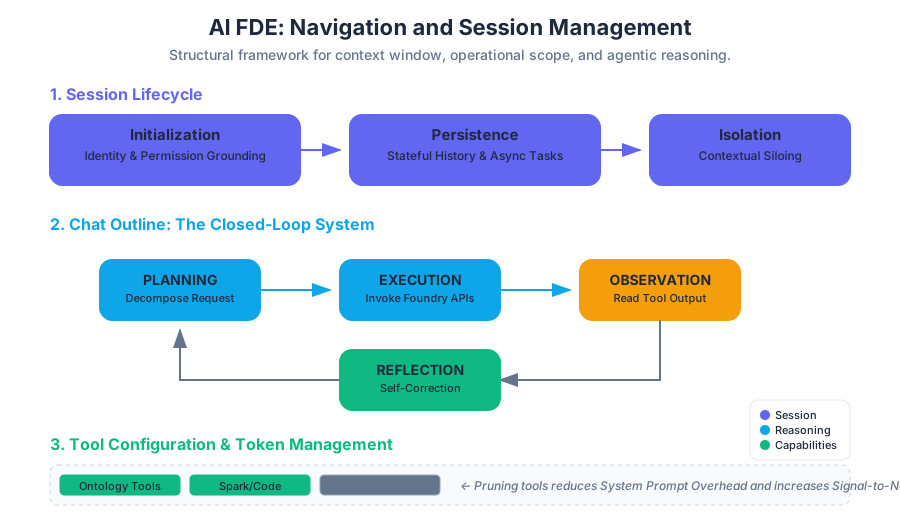
Session Management in AI FDE refers to the creation, persistence, and isolation of a discrete workspace where the agent and the user collaborate on a specific set of objectives. Unlike a standard stateless LLM chat, an AI FDE session is a stateful environment that tracks the history of data transformations, ontology edits, and code executions.
What it is
A session is a logical container for a "mission." It encapsulates the chat history, the current state of the filesystem (if applicable), and the specific set of resources the agent has been "grounded" upon.
Why it matters
Without robust session management, the agent would suffer from contextual drift. If a user attempts to build a supply chain pipeline and a financial reporting dashboard in the same session, the agent's internal "world model" becomes cluttered with irrelevant metadata. This leads to increased latency, higher token costs, and a higher probability of hallucinations as the agent struggles to distinguish between unrelated schemas.
How it works: The Lifecycle of a Session
- Initialization: The user starts a session by providing an initial prompt. At this stage, the AI FDE initializes its "System Prompt" based on the user's identity and permissions.
- Persistence: Sessions are saved automatically. This allows for asynchronous engineering—a user can initiate a complex data integration task, leave the application, and return later to find the agent has completed the "Plan-Act-Observe" loop.
- Isolation: Each session operates in a silo. Changes made to the logic of a session (like a proposed plan) do not leak into other sessions, although changes made to the underlying data (like saving a dataset to Foundry) are permanent and globally visible to authorized users.
| Feature | Description | Impact on Engineering |
|---|---|---|
| State Persistence | Saves the full history of tool outputs and agent reasoning. | Allows for multi-day project execution and auditing. |
| Context Isolation | Prevents cross-contamination between different engineering tasks. | Reduces hallucination and improves tool-calling accuracy. |
| Branching | (Advanced) The ability to iterate on a task without destroying previous work. | Facilitates "What-if" analysis in data modeling. |
Chat Outline and Reasoning Transparency
The Chat Outline is the navigational spine of the AI FDE interface. It provides a hierarchical view of the interaction, moving beyond a simple "message bubble" format to a structured log of the agent's cognitive process.
What it is
The Chat Outline is a real-time visualization of the agent's Chain of Thought (CoT) and its tool-calling sequence. It breaks down a high-level request (e.g., "Clean the hospital datasets and link them to the Patient object") into granular sub-tasks.
Mechanics: The Plan-Act-Observe Loop
AI FDE operates on a closed-loop system. The Chat Outline reflects this cycle:
- Planning: The agent decomposes the natural language request into a sequence of tool calls.
- Execution: The agent invokes specific Foundry APIs (e.g.,
create_dataset,apply_schema). - Observation: The agent reads the output of the tool (success messages, stack traces, or data previews).
- Reflection: The agent determines if the goal was met or if an error requires a change in strategy.
Definition: Closed-loop Operation A system where the output of an action is fed back into the agent as a new input, allowing the agent to self-correct and validate its work without human intervention at every step.
Why it matters
For a senior engineer, the Chat Outline is a debugging tool. If the agent fails to join two datasets, the engineer can look at the "Observation" block in the outline to see the specific schema mismatch error. This transparency transforms the LLM from a "black box" into a "glass box."
AI_DEMOI_DEMO--
Tool Configuration and Token Management
Tool Configuration allows users to enable or disable specific capabilities (skills) within a session. This is a critical optimization lever for managing the agent's performance and the user's budget.
What it is
Every capability the AI FDE possesses—whether it is writing Spark code, editing the Ontology, or searching the filesystem—is represented as a "Tool." In the configuration panel, users can toggle these tools on or off.
The Economics of Tokens
LLMs have a finite Context Window (the total amount of text they can process at once). Every tool enabled adds a "Tool Definition" to the system prompt.
- System Prompt Overhead: If you enable 50 tools, the agent must "read" the documentation for all 50 tools before it even processes your question.
- Noise-to-Signal Ratio: Too many tools can lead to "Tool Confusion," where the agent selects a suboptimal tool because its description overlaps with another.
Comparison of Tool Scopes
| Tool Category | Example Capability | Token Weight | Recommended Use Case |
|---|---|---|---|
| Core Skills | Plan generation, summarization | Low | Always enabled. |
| Data Integration | Schema mapping, JDBC connection | Medium | Initial data ingestion phases. |
| Ontology Editing | Creating object types, defining links | High | Final stages of data modeling. |
| Filesystem | ls, cat, grep on Foundry folders |
Low | Resource discovery and navigation. |
Common Pitfall: The "Everything Everywhere" Approach
New users often enable all tools to "give the agent more power." This is counterproductive. A focused toolset ensures the agent stays within the relevant domain, reducing the latency caused by the LLM processing thousands of tokens of irrelevant tool documentation.
Manual Resource Selection (Grounding)
Manual Resource Selection is the process of explicitly defining the "Search Space" for the agent. While AI FDE can search for resources, manually pinning datasets or folders provides a "Ground Truth" that overrides the agent's search heuristics.
What it is
It is a mechanism to provide Context Management by selecting specific Foundry resources (datasets, models, or folders) that the agent must use for the current task.
Why it matters: Solving the "Needle in a Haystack" Problem
In a large-scale Foundry instance with millions of datasets, an agent might struggle to find the "Active" version of a dim_patient table among hundreds of "Test" or "Backup" versions. By manually selecting the resource, the user provides a direct pointer to the correct metadata.
Implementation Mechanics
When a resource is manually selected, its RID (Resource Identifier) and schema are injected directly into the agent's context. This bypasses the need for the agent to perform a search() call, which:
- Saves Tokens: No need for search result processing.
- Increases Precision: The agent is forced to use the specific schema of the selected resource.
- Ensures Security: The agent cannot "accidentally" look at a similar dataset it shouldn't be using for that specific task.
Modes and Skills: The Functional Architecture
AI FDE organizes its capabilities into Modes and Skills. Understanding the distinction is vital for navigating the interface effectively.
Modes
Modes are broad task contexts. Think of a Mode as a "Persona" or a "Workstation."
- Data Integration Mode: Optimized for moving data from raw sources into Foundry.
- Ontology Mode: Optimized for mapping datasets to the semantic layer (Objects and Links).
Skills
Skills are the granular actions available within or across modes.
- Agent Skills: Meta-capabilities like "Planning" or "Self-Correction."
- Domain Skills: Specific technical capabilities like "Writing Python Transforms."
Interaction Table: Modes vs. Skills
| Feature | Modes | Skills |
|---|---|---|
| Granularity | Coarse (The "What") | Fine (The "How") |
| Context | Sets the overall environment. | Provides specific API access. |
| User Control | Selected at the start of a workflow. | Toggled individually in Tool Config. |
| Example | "I am in Data Engineering mode." | "I am using the spark_sql skill." |
Security and Governance in Navigation
A unique aspect of AI FDE navigation is that it operates entirely under the User's Identity. This has profound implications for session management and tool execution.
User Identity and Permissions
Unlike a standard "Service Account" bot, AI FDE is an extension of the user. If a user does not have Compass:View permissions on a folder, the AI FDE cannot see that folder. If the user cannot Edit an object type, the agent's attempt to do so will result in a 403 Forbidden error in the Chat Outline.
The Tool Approval System
For sensitive operations (e.g., deleting a dataset or changing a production pipeline), the AI FDE interface includes a Tool Approval step.
- The agent proposes an action (e.g.,
delete_resource(rid=...)). - The UI pauses execution and presents a "Review" button to the user.
- The user must explicitly approve the tool call before the agent proceeds.
Audit Logging and Attribution
Every action taken by the AI FDE is attributed to the user in the Foundry Audit Logs.
User [John Doe] performed [Update Schema] via [AI FDE Session ID: 12345]
This ensures that "The AI did it" is never an excuse for a governance breach. The session history itself serves as a permanent record of the intent and the execution.
Best Practices for Navigation and Session Management
To maximize the utility of AI FDE, senior engineers should follow a set of "Agentic Design Patterns."
1. Problem Decomposition
Do not ask the agent to "Build the whole project." Instead, use the session to tackle one module at a time.
- Bad Prompt: "Build a full ETL pipeline for my sales data."
- Good Prompt: "First, let's explore the
raw_salesfolder and identify the schema of the CSV files."
2. Iterative Development
Use the Chat Outline to monitor the agent's progress. If you see the agent struggling with a specific tool call (e.g., repeatedly failing a regex match), intervene manually. You can provide a hint: "Try using the re.VERBOSE flag in the Python transform."
3. Infrastructure Constraints
High-frequency agent operations (like running 50 small Spark jobs in a row) can put significant strain on cluster resources. Manage your session by grouping tasks to minimize the overhead of starting and stopping compute environments.
4. Resource Verification
Always use the "Preview" feature in the Chat Outline to verify that the data the agent is reading matches your expectations. Never assume the agent's Observation is 100% accurate without a cursory human check of the underlying resource.
Technical Implementation: The Agent's Context Window
To understand why manual selection and tool configuration matter, we must look at the mathematical constraint of the Context Window ($C$).
The total context $C$ is composed of: $$C = P_{sys} + T_{def} + R_{meta} + H_{chat} + Q_{user}$$
Where:
- $P_{sys}$: The core system instructions (static).
- $T_{def}$: The sum of all enabled Tool Definitions.
- $R_{meta}$: Metadata of Manually Selected Resources.
- $H_{chat}$: The rolling Chat History (summarized or truncated if $C$ is exceeded).
- $Q_{user}$: The current User Query.
By disabling unnecessary tools ($T_{def}$) and manually selecting only relevant resources ($R_{meta}$), the user maximizes the remaining space for $H_{chat}$, allowing the agent to "remember" more of the complex logic discussed earlier in the session.
# Conceptual representation of a Tool Configuration filter
def get_agent_prompt(enabled_tools, selected_resources, chat_history):
    prompt = "You are an AI FDE. Your available tools are:\n"

    # Tool Configuration impacts the size of this loop
    for tool in enabled_tools:
        prompt += tool.describe()

    # Manual Resource Selection provides direct grounding
    prompt += "\nFocus your analysis on these specific resources:\n"
    for res in selected_resources:
        prompt += f"Resource: {res.name}, Schema: {res.schema}\n"

    prompt += f"\nRecent History: {chat_history.tail(10)}"
    return prompt
Summary
Navigation and Session Management in AI FDE are the primary interfaces for Human-in-the-Loop (HITL) engineering. By mastering the Chat Outline, optimizing Tool Configurations, and strategically grounding the agent through Manual Resource Selection, engineers can steer the AI toward complex, high-value outcomes while maintaining the strict governance and security standards required by the Palantir Foundry platform.
Modes and Skills
Key concepts: Modes · Skills · Agent Skills · Domain Skills
Exploring the hierarchy of Modes and Skills that define the agent's capabilities and focus areas.
Modes and Skills
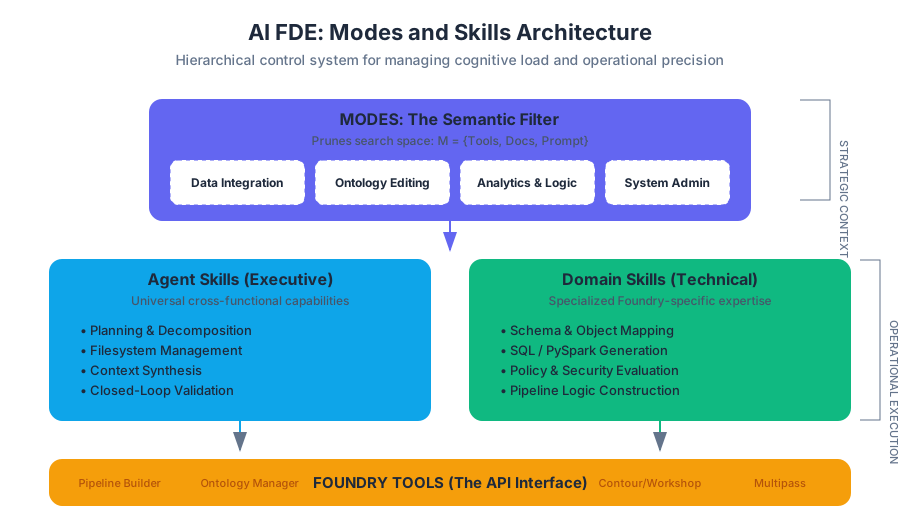
In the architecture of the AI Forward Deployed Engineer (AI FDE), the concepts of Modes and Skills represent the fundamental mechanism for managing cognitive load and operational precision. As an interactive agent operating within the complex ecosystem of Palantir Foundry, the AI FDE must navigate thousands of potential actions, datasets, and metadata structures. Without a structured framework to prune the search space of possible actions, an LLM-based agent would suffer from "tool sprawl," leading to increased latency, higher costs, and a significant degradation in reasoning accuracy.
The Modes and Skills framework serves as a hierarchical control system. It allows the agent to switch between high-level "mindsets" (Modes) while maintaining access to a library of atomic, functional capabilities (Skills). This section explores the technical implementation, strategic utility, and governance of these constructs.
AI_SVGI_SVG## The Architecture of Agency: Modes
A Mode is a high-level configuration that defines the broad task context for an AI FDE session. It acts as a semantic filter on the agent’s environment, determining which tools are "in-scope" and which documentation sets are prioritized in the context window.
What it is
Mathematically, if $T$ is the set of all available tools in Foundry and $D$ is the set of all documentation, a Mode $M$ can be defined as a subset: $$M = {T_{subset}, D_{subset}, P_{prompt}}$$ where $P_{prompt}$ is a specialized system prompt that tunes the LLM's reasoning patterns for a specific domain (e.g., prioritizing schema stability in Data Integration or semantic consistency in Ontology Editing).
Why it matters
The primary challenge in agentic AI is the "Curse of Choice." When an agent is presented with too many tools, the probability of selecting an incorrect tool or hallucinating a parameter increases. Modes solve this by:
- Reducing Noise: By excluding irrelevant tools (e.g., hiding Ontology tools during a raw data ingestion task), the agent's attention is focused.
- Optimizing Token Usage: Context windows are finite. Loading documentation for every Foundry feature would exhaust the window and dilute the relevance of the prompt.
- Enhancing Security: While the agent operates under user permissions, Modes provide a secondary layer of operational intent, ensuring the agent doesn't accidentally trigger unrelated workflows.
How it works
When a user selects a Mode, the AI FDE initializes a new state. This state includes a curated list of Tool Definitions (JSON schemas describing tool inputs/outputs) and RAG (Retrieval-Augmented Generation) Indexes specific to that domain.
| Mode | Primary Focus | Key Tools | Typical Use Case |
|---|---|---|---|
| Data Integration | Pipeline construction and data flow. | Pipeline Builder, SQL transforms, Dataset previews. | Ingesting S3 logs and cleaning them for downstream use. |
| Ontology Editing | Semantic modeling and object mapping. | Ontology Manager, Object Type creation, Link definitions. | Mapping a "Flights" dataset to a "Flight" Object Type. |
| Analytics & Logic | Data consumption and insight generation. | Contour, Workshop, Python functions. | Building a dashboard to track supply chain disruptions. |
| System Admin | Governance and resource management. | Permission checks, Namespace configuration. | Auditing user access to sensitive PII datasets. |
Granular Capabilities: Skills
While Modes provide the "where" and "why," Skills provide the "how." A Skill is a granular capability that the AI FDE can invoke to perform a specific action or reasoning step. Skills are the building blocks of the agent's plan.
Agent Skills
Agent Skills are general-purpose, cross-functional capabilities that are usually independent of the specific Foundry domain. They represent the "executive functions" of the AI FDE.
- Planning: The ability to decompose a high-level natural language request into a sequence of tool calls.
- Filesystem Management: Navigating the Foundry folder structure, creating folders, and organizing resources.
- Context Synthesis: Summarizing long execution logs or error messages to provide the user with a concise status update.
- Validation: The "closed-loop" capability where the agent checks its own work against a set of success criteria.
Domain Skills
Domain Skills are specialized capabilities tied to specific technical areas. These are often what users think of as "Foundry expertise."
- Schema Mapping: The skill of looking at a raw CSV and a target Ontology Object and determining the correct casting and mapping logic.
- SQL/Python Generation: Writing syntactically correct code that adheres to Foundry’s specific libraries (e.g., transforms-python).
- Policy Evaluation: Understanding and applying complex Multipass or Compass security policies during resource creation.
Key Insight: The distinction between a Tool and a Skill is subtle but vital. A Tool is the technical interface (the API call), while a Skill is the agent's learned ability to use that tool effectively within a broader workflow.
| Feature | Agent Skills | Domain Skills |
|---|---|---|
| Scope | Universal across all Modes. | Specific to one or two Modes. |
| Function | Meta-cognition and organization. | Technical execution and domain logic. |
| Example | "Create a plan to solve the user's request." | "Write a PySpark transform to join these tables." |
| Dependency | Relies on LLM reasoning capabilities. | Relies on Foundry-specific APIs and documentation. |
The Closed-Loop Operational Model
The AI FDE does not operate in an "open-loop" (fire and forget) fashion. Instead, it utilizes the Modes and Skills framework to execute a Closed-Loop Operation. This is the core of the "Forward Deployed Engineer" metaphor—the agent doesn't just suggest code; it implements, tests, and iterates.
The Execution Cycle
- Request: The user provides a command ("Clean the hospital arrivals data and map it to the Patient object").
- Mode Alignment: The agent identifies that this spans Data Integration and Ontology modes.
- Planning (Agent Skill): The agent generates a multi-step DAG (Directed Acyclic Graph) of actions.
- Tool Execution (Domain Skill): The agent calls the
create_transformtool. - Observation: The agent reads the output of the transform. If it fails, it uses its Error Recovery Skill to diagnose the stack trace.
- Validation: The agent checks the final output against the user's original intent.
AI_DEMOI_DEMO### Concrete Example: Schema Evolution Imagine a user asks to add a "Priority" column to an existing dataset based on a logic check.
- Mode: Data Integration.
- Skill Used:
get_dataset_schema(Domain Skill). - Action: The agent retrieves the schema, identifies the column types, and writes a transformation.
- Validation: The agent runs a "Preview" (Skill) to ensure the "Priority" column isn't all nulls before committing the change.
Security, Governance, and Tool Approval
A critical component of the Modes and Skills framework is its integration with Foundry's security model. The AI FDE is not a "super-user" or a service account; it is a proxied identity.
Identity-Based Execution
Every skill the AI FDE exercises is performed using the user's existing OAuth token. If a user does not have Compass:DiscoverDataset permissions on a specific folder, the AI FDE’s "Search" skill will return zero results for that folder. This ensures that the agent cannot be used as a vector for privilege escalation.
The Tool Approval System
For sensitive operations—such as deleting a dataset, changing permissions, or executing a large-scale data write—the AI FDE utilizes a Tool Approval System.
| Approval Level | Description | Example Action |
|---|---|---|
| Auto-Execute | Low-risk, read-only, or metadata actions. | get_schema, list_files, preview_data. |
| User Confirmation | Actions that modify data or create resources. | save_code_block, create_object_type. |
| High-Stakes | Actions with significant infrastructure or security impact. | delete_resource, change_organization_policy. |
Audit Logging and Attribution
Every skill invocation is logged in the Foundry Audit Trail. The log doesn't just say "AI FDE did X"; it says "User A, via AI FDE, invoked Skill Y using Tool Z." This ensures full accountability and allows administrators to track LLM usage and costs at the granular user level.
Best Practices for Mode and Skill Management
To maximize the effectiveness of the AI FDE, users and administrators should adhere to several best practices derived from real-world FDE workflows.
1. Problem Decomposition
Large, monolithic requests ("Build me a complete supply chain twin") often lead to "Plan Drift," where the agent loses track of the initial goal.
- Better Approach: Break the task into Mode-specific chunks. Use Data Integration mode to land the data first, then switch to Ontology mode to model it.
2. Context Limitation
While it is tempting to give the agent access to every tool in the catalog, this increases the "distraction surface."
- Practice: Use the Tool Configuration menu to disable skills that are not relevant to your current project. If you aren't doing Geospatial analysis, disable the Coordinate Transformation skills.
3. Iterative Verification
The AI FDE is a "copilot," not a "replacement."
- Practice: Use the Chat Outline to track the agent's progress. After the agent completes a "Skill" (like writing a SQL query), manually verify the logic in the preview window before allowing it to proceed to the next step in the plan.
4. Managing Infrastructure Constraints
High-frequency skill execution (e.g., an agent trying to fix a bug in a loop) can put significant stress on Foundry's compute infrastructure.
- Practice: Be mindful of the "Observation" phase. If an agent is repeatedly failing a task, intervene manually rather than letting it exhaust its retry budget.
Common Pitfalls and Misconceptions
Pitfall: "The Agent is a Service Account"
Reality: The agent is a session-bound proxy. If your session expires, the agent's ability to execute skills expires. It cannot run "background jobs" autonomously without an active user session.
Pitfall: "Mode Switching Clears Memory"
Reality: Switching modes changes the available tools, but the Chat History (the context of the conversation) usually persists. However, the agent's "attention" will shift. If you switch from Data Integration to Ontology, the agent will prioritize "Object" definitions over "Join" logic in its reasoning.
Pitfall: "Hallucinated Skills"
Reality: Sometimes an LLM will attempt to use a skill it thinks should exist (e.g., optimize_spark_shuffles) but which isn't actually in the Foundry toolset.
- Solution: Always check the "Tool Approval" request. If the tool name looks unfamiliar or overly generic, it may be a hallucination.
Summary of Skill Taxonomy
To conclude, the following table summarizes the hierarchy of capabilities within the AI FDE environment.
| Level | Name | Controlled By | Purpose |
|---|---|---|---|
| L1 | Mode | User Selection | Defines the "Mindset" and high-level domain. |
| L2 | Agent Skill | System Architecture | Provides core reasoning and planning capabilities. |
| L3 | Domain Skill | Tool Configuration | Provides technical execution within a specific Foundry module. |
| L4 | Tool | API / Permissions | The atomic action that interacts with Foundry's backend. |
Security and Governance
Key concepts: User Identity and Permissions · Tool Approval System · Audit Logging · Governance Controls
A deep dive into how AI FDE maintains security through user identity, permissions, and audit logging.
Security and Governance
In the architectural paradigm of the AI Forward Deployed Engineer (AI FDE), security is not a peripheral layer but a foundational constraint. As an interactive agent operating within the Palantir Foundry ecosystem, the AI FDE possesses the capability to perform complex data transformations, edit ontologies, and manage resources. Without a robust governance framework, such an agent could inadvertently breach data silos or execute destructive operations.
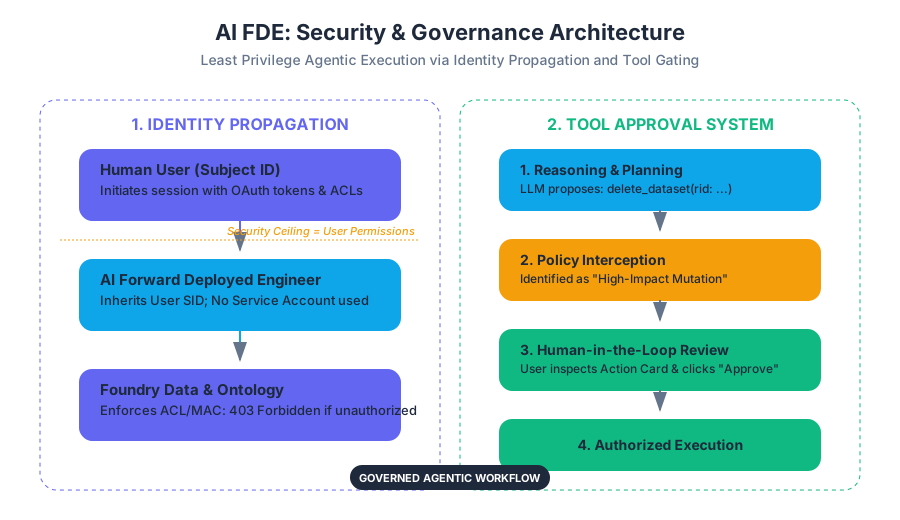
The security architecture of AI FDE is predicated on the principle of Least Privilege Agentic Execution. This ensures that the agent’s operational ceiling is exactly equal to—and never greater than—the permissions of the human user initiating the session. By strictly adhering to the user's existing security context, AI FDE transforms from a potential liability into a governed, transparent extension of human intent.
AI_SVGI_SVG## User Identity and Permissions
The core differentiator of AI FDE compared to traditional automation bots or "black-box" AI services is its reliance on Identity Propagation. In many enterprise AI implementations, an agent operates via a high-privilege "Service Account" that has broad access to backend databases. This creates a "security blind spot" where the system cannot easily distinguish between a legitimate user request and an unauthorized agent action.
What it is
AI FDE operates entirely within the user's existing Foundry Session. It utilizes the user’s specific OAuth tokens and security descriptors to interact with the Foundry API.
Definition: Identity Propagation The mechanism by which a user's security credentials and permissions are passed through an intermediary agent (the AI FDE) to downstream services, ensuring that the agent's actions are restricted by the same Access Control Lists (ACLs) and Mandatory Access Controls (MACs) as the user.
Why it matters
In high-stakes environments—such as healthcare, defense, or finance—data is often siloed by sensitivity levels. If an AI agent used a service account, it might accidentally leak "Level 4" data to a "Level 2" user during a summarization task. By using the user's identity, the AI FDE is physically unable to "see" or "touch" data that the user cannot access.
How it works
- Session Initiation: When a user opens an AI FDE session, the agent inherits the user's Subject Identifier (SID).
- Permission Check: Every time the agent attempts to call a tool (e.g.,
read_datasetoredit_ontology_object), the underlying Foundry service performs a standard permission check against the user's SID. - Scope Enforcement: If the user lacks
Compass:Vieweron a folder, the AI FDE's request to list files in that folder will return a403 Forbiddenerror, which the agent must then handle gracefully in the conversation.
| Feature | Traditional Service Account Bot | AI FDE (Identity Propagation) |
|---|---|---|
| Identity | Static, high-privilege account | Dynamic, matches the active user |
| Access Control | Broad, often bypasses granular ACLs | Strictly limited by user's specific ACLs |
| Auditability | Actions attributed to "Bot_User" | Actions attributed to "Human_User" |
| Risk Profile | High (Potential for privilege escalation) | Low (No more power than the user) |
| Maintenance | Requires managing separate credentials | No additional credential management |
Common Pitfalls
- The "Invisible Data" Problem: Users may ask AI FDE to analyze a dataset they think they have access to, but don't. The agent will report it cannot find the resource. Users often mistake this for an AI "hallucination" or failure, when it is actually a successful security enforcement.
- Over-reliance on User Knowledge: Because the agent only sees what the user sees, if a user has messy permissions, the agent’s view of the world will be equally fragmented.
Tool Approval System
While permissions dictate what the agent can access, the Tool Approval System dictates when and how the agent can act. This is the primary mechanism for human-in-the-loop (HITL) governance.
What it is
The Tool Approval System is a gating mechanism that intercepts high-impact tool calls and requires explicit human confirmation before execution. It categorizes tools based on their potential for side effects (mutating data, deleting resources, or incurring high costs).
Why it matters
Even with the correct permissions, an AI might generate a plan that is technically valid but logically flawed—for example, deleting a production dataset instead of a development one. The approval system prevents "runaway agent" scenarios where a single prompt leads to a cascade of unintended mutations.
How it works: The Plan-Validate-Execute Cycle
- Reasoning: The LLM determines that to satisfy the user's request, it must use a specific tool (e.g.,
delete_resource). - Interception: The AI FDE framework identifies the tool as "High Sensitivity."
- Staging: Instead of executing, the agent presents a "Plan" or "Action Card" to the user.
- User Review: The user inspects the parameters (e.g.,
resource_rid: ri.foundry.main.dataset...). - Execution/Rejection: Only upon the user clicking "Approve" does the agent receive the authorization token to fire the tool call.
| Tool Category | Example Tools | Approval Requirement |
|---|---|---|
| Read-Only / Discovery | list_files, get_schema, search_ontology |
Implicit (No approval required) |
| Non-Destructive Mutation | create_folder, add_comment, update_metadata |
Configurable (Default: Approval required) |
| High-Impact Mutation | delete_dataset, truncate_table, modify_security_policy |
Mandatory (Always requires approval) |
| Infrastructure / Cost | start_compute_cluster, run_heavy_transform |
Mandatory (Due to token/compute cost) |
Concrete Example: Ontology Editing
Imagine a user asks: "Update the 'Status' property of all 'Active' aircraft to 'Maintenance'." The AI FDE doesn't just do it. It generates a summary: "I will update 42 objects in the Aircraft object type. [View Details] [Approve] [Cancel]". The user can expand the details to see the exact logic before committing the change to the production ontology.
AI_DEMOI_DEMO--
Audit Logging and Attribution
In an enterprise environment, "Who did what and when?" is the most critical question for compliance. AI FDE provides a granular, immutable audit trail that links every AI-generated action back to the human operator.
What it is
Audit Logging in AI FDE is the systematic recording of every prompt, every LLM reasoning step (thought trace), every tool call, and every resulting data change. Attribution ensures that these logs are signed with the user's identity.
Why it matters
If a data breach or a corruption event occurs, investigators must be able to determine if the user performed the action manually or if the AI FDE performed it on their behalf. This is essential for Non-repudiation—the inability of a user to deny having performed an action.
How it works
Every interaction is logged in a centralized Foundry audit store. These logs typically include:
- Timestamp: Precise UTC time of the event.
- User ID: The SID of the human operator.
- Prompt: The raw natural language input.
- Tool Call: The specific function name and JSON arguments passed to the Foundry API.
- LLM Metadata: The model version (e.g., GPT-4), token count, and "thought" process.
- Result: The success/failure status of the operation.
{
  "event_type": "TOOL_EXECUTION",
  "timestamp": "2023-10-27T14:20:01Z",
  "user_id": "john.doe@example.com",
  "agent_id": "fde-agent-v1",
  "tool": "ontology.updateObject",
  "parameters": {
    "object_rid": "ri.ontology.main.object.123",
    "properties": { "status": "Maintenance" }
  },
  "approval_status": "APPROVED_BY_USER",
  "trace_id": "abc-123-xyz"
}
Variations: LLM Usage Tracking
Beyond security, audit logs are used for LLM Usage Tracking. This allows administrators to monitor token consumption per user or per department, preventing a few power users from exhausting the organization's AI compute budget.
Governance Controls and Infrastructure Constraints
The final pillar of the security framework involves administrative controls that limit the "blast radius" of the AI FDE at the system level.
What it is
Governance Controls are the knobs and levers available to Foundry administrators to restrict how AI FDE behaves across the entire organization. This includes enabling/disabling specific Modes or Skills and setting resource quotas.
Why it matters
AI operations are computationally expensive and potentially risky. Administrators need the ability to "turn off" certain capabilities (like code execution) in sensitive environments or for specific groups of users.
Key Governance Mechanisms
- Mode Restriction: Admins can restrict the "Ontology Editing" mode to only the Data Engineering team, while leaving "Data Discovery" open to all.
- Skill Whitelisting: Specific granular capabilities (e.g., the ability to write Python transforms) can be toggled on or off based on organizational policy.
- Token Quotas: To manage costs, admins can set daily or monthly token limits for AI FDE usage.
- Context Window Management: AI FDE manages context by selectively pruning old messages or irrelevant metadata. Governance controls ensure that sensitive metadata isn't "leaked" into the LLM's long-term context if it violates privacy policies.
| Control Type | Description | Impact |
|---|---|---|
| Skill Gating | Disabling tools like filesystem.delete |
Prevents accidental or malicious data loss. |
| Rate Limiting | Capping the number of requests per minute | Protects Foundry infrastructure from being overwhelmed. |
| Model Selection | Forcing the use of specific, vetted LLM versions | Ensures compliance with data privacy (e.g., using an internal LLM). |
| Resource Verification | Mandatory verification of generated resources | Ensures human oversight of all AI-created assets. |
Common Pitfalls: Infrastructure Constraints
A common mistake is treating AI FDE as an infinite resource. Because it operates "closed-loop" (executing, observing, and iterating), a single complex request can trigger dozens of tool calls and thousands of tokens. Without strict governance controls, a user might inadvertently launch a recursive loop that consumes significant infrastructure credits.
Synthesis: The "Closed-Loop" Security Model
The power of AI FDE lies in its Closed-loop operation. It doesn't just suggest code; it runs it, checks the output, and fixes errors. From a security perspective, this "loop" must be tightly bound.
- Input: User provides a command.
- Constraint: System checks if the user has permission to even think about that task.
- Reasoning: AI plans the steps.
- Gate: User approves the high-risk steps.
- Execution: System uses the user's identity to call the API.
- Observation: System logs the result for audit.
- Validation: Human verifies the final resource.
This cycle ensures that the AI FDE remains an agent of the user, not an independent actor. It solves the "Agency Problem" in AI by ensuring that every action is authorized, attributed, and auditable.
AI_STUDY_GUIDEI_STUDY_GUIDE## AI FDE Security Study Guide
1. Core Philosophy
- Identity-Centric: AI FDE is not a bot; it is a "proxy" for the user.
- Human-in-the-Loop: High-impact actions require explicit confirmation.
- Transparent: Every thought and action is logged.
2. Key Technical Terms
- Identity Propagation: Passing user credentials to the agent.
- Tool Approval: The gating mechanism for sensitive tools.
- Audit Attribution: Linking logs to a specific human user.
- Skill Gating: Administrative control over agent capabilities.
3. Critical Comparisons
- Understand the difference between Permissions (what you can do) and Approvals (what you should do right now).
- Contrast Service Accounts (risky) with User Sessions (secure).
4. Best Practices for Users
- Always verify the "Action Card" before clicking Approve.
- Decompose complex problems into smaller steps to make the Audit Log more readable.
- Be aware of your own permission limits; the AI cannot bypass them for you.
5. Administrative Checklist
- Define which user groups have access to which AI FDE Modes.
- Set token quotas to manage costs.
- Regularly review Audit Logs for anomalous agent behavior.
- Configure mandatory approval for all destructive tools.
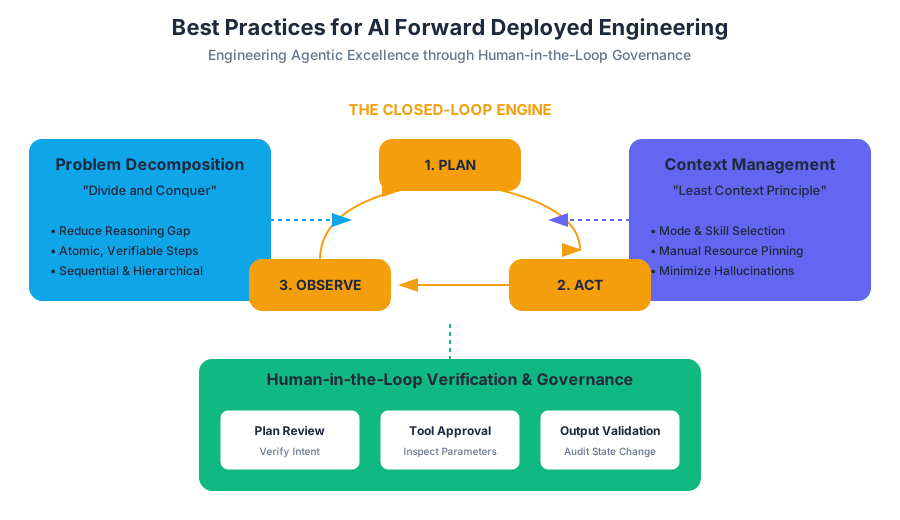
Best Practices for AI FDE
Key concepts: Human Verification · Iterative Development · Problem Decomposition · Infrastructure Constraints
Essential strategies for maximizing the effectiveness of AI FDE while managing infrastructure constraints.
Best Practices for AI FDE: Engineering Agentic Excellence in Foundry
The AI Forward Deployed Engineer (AI FDE) represents a paradigm shift in data platform interaction. Rather than manually navigating complex UI menus or writing boilerplate ETL code, users interact with a closed-loop agentic system that translates high-level natural language intent into low-level Foundry operations. However, the transition from manual engineering to "agent-orchestrated" engineering requires a new set of mental models and operational rigors.
To leverage AI FDE effectively, one must move beyond simple "chatting" and adopt the mindset of a Technical Lead managing a highly capable but occasionally over-eager junior engineer. This article explores the core pillars of AI FDE best practices: Human Verification, Problem Decomposition, Context Management, and Infrastructure Awareness.
AI_SVGI_SVG## 1. The Human-in-the-Loop: Verification and Governance
At its core, AI FDE is an interactive agent, not an autonomous black box. It operates entirely within the security context of the logged-in user, meaning it possesses the same permissions—and the same potential for destructive action—as the human operator.
The Principle of Active Review
The most critical best practice is Human Verification. AI FDE utilizes a "Plan-Act-Observe" cycle. Before the agent executes a destructive or complex tool (such as deleting a dataset or modifying an ontology primary key), it generates a proposed plan.
Definition: Closed-Loop Operation A system architecture where the agent executes an action, observes the state change in the environment (Foundry), compares the result against the intended goal, and adjusts its next step accordingly.
Verification should occur at three distinct levels:
- Plan Verification: Reviewing the natural language steps the agent intends to take.
- Tool Approval: Inspecting the specific parameters being passed to Foundry tools (e.g., checking the
WHEREclause in a data transformation). - Output Validation: Inspecting the resulting data or metadata changes to ensure they align with the business logic.
Security and Attribution
Because AI FDE acts as a proxy for the user, Audit Logging and Attribution are paramount. Every action taken by the agent is tagged with the user's ID. This ensures that governance is not bypassed by the AI.
| Governance Feature | Mechanism | Purpose |
|---|---|---|
| User Identity | Session-based authentication | Ensures the AI cannot access data the user cannot. |
| Tool Approval System | Manual gated execution | Prevents the agent from executing sensitive "Write" operations without consent. |
| Audit Logging | Full-trace telemetry | Provides a historical record of every LLM prompt and tool call. |
| LLM Usage Tracking | Token metering | Monitors compute consumption and cost attribution per user/project. |
2. Problem Decomposition: The "Divide and Conquer" Strategy
A common failure mode in agentic workflows is the "Mega-Prompt"—asking the agent to perform a massive, multi-stage data integration in a single turn. While LLMs are increasingly capable, the probability of error increases exponentially with the complexity of the request.
Reducing the Reasoning Gap
Problem Decomposition is the process of breaking a complex objective into atomic, verifiable sub-tasks. This reduces the "Reasoning Gap"—the distance between the current state and the goal state.
- Ineffective Prompt: "Build a full pipeline that cleans the CRM data, joins it with the ERP tables, and creates an ontology object for 'Customer' with five measures."
- Effective Decomposition:
- "Identify the schema of the raw CRM and ERP datasets."
- "Create a transformation to normalize the date formats in the CRM data."
- "Perform a join on the
customer_idfield and check for orphans." - "Map the joined output to the 'Customer' Object Type in the Ontology."
Benefits of Granularity
By decomposing tasks, you provide the agent with a "checkpoint" at every stage. If the agent fails at step 3, you only need to debug the join logic, rather than unravelling a massive, failed pipeline.
| Strategy | Description | Best For |
|---|---|---|
| Sequential Decomposition | Breaking a task into a linear chain of steps. | ETL pipelines, data cleaning. |
| Hierarchical Decomposition | Breaking a large system into sub-modules (e.g., Data, Ontology, Security). | Full application builds. |
| Iterative Refinement | Starting with a "skeleton" and adding complexity in passes. | Complex logic or dashboarding. |
AI_DEMOI_DEMO## 3. Context Management and Tool Limitation
The AI FDE's performance is heavily influenced by its Context Window—the amount of information (metadata, documentation, chat history) it can "see" at once. Providing too much context leads to "distraction" or "hallucinations," where the agent attempts to use irrelevant datasets or tools.
Modes and Skills
AI FDE uses Modes and Skills to manage this cognitive load.
- Modes: Broad task contexts (e.g., "Ontology Editing Mode" or "Data Integration Mode"). Switching modes swaps the underlying toolsets and documentation available to the agent.
- Skills: Granular capabilities (e.g., "Filesystem Management" or "Plan Generation").
The "Least Context" Principle
Users should manually select only the resources (datasets, folders, code repositories) relevant to the current sub-task. If you are fixing a bug in a specific dataset, do not add the entire project folder to the context. This keeps the agent's focus sharp and reduces token costs.
| Context Element | Management Strategy | Impact on Performance |
|---|---|---|
| Chat Outline | Periodically clear or summarize | Reduces "noise" from previous, unrelated tasks. |
| Resource Selection | Manual "Pinning" of datasets | Ensures the agent uses the correct version of truth. |
| Tool Configuration | Disabling unnecessary tools | Prevents the agent from choosing suboptimal paths. |
4. Iterative Development: The Agile Agentic Cycle
Development with AI FDE is rarely a "one-shot" process. It is an Iterative Development cycle. This involves building a basic version of a resource, testing it, and then asking the agent to refine it.
The Feedback Loop
When the agent produces an error (e.g., a failed Spark job), do not simply repeat the prompt. Instead, provide the agent with the error log. AI FDE is designed to ingest error traces and propose fixes. This "Closed-Loop" debugging is often faster than manual troubleshooting.
Key Insight: Stochastic vs. Deterministic LLMs are stochastic (probabilistic). The same prompt may yield slightly different code. Iterative development allows you to "steer" the agent toward a deterministic, high-quality outcome through successive refinement.
Example: Building an Ontology
- Iteration 1: Ask AI FDE to suggest an object schema based on a dataset.
- Iteration 2: Review the schema and ask to change specific data types (e.g., "Change
pricefrom string to double"). - Iteration 3: Ask the agent to establish a many-to-one relationship with an existing "Vendor" object.
- Iteration 4: Verify the metadata in the Ontology Manager and finalize.
5. Infrastructure Constraints and Operational Realities
While AI FDE feels like magic, it is bound by the physical and logical constraints of the underlying infrastructure. High-frequency AI operations place significant demands on compute resources.
Token Economy and Rate Limiting
Every message sent to AI FDE consumes Tokens. Large datasets with thousands of columns or complex folder hierarchies can quickly exhaust the context window or trigger rate limits on the LLM provider.
- Rate Limiting: If you prompt the agent too rapidly or with excessively large payloads, the system may throttle requests to ensure stability for other users.
- Compute Latency: Complex reasoning tasks (like writing optimized Spark SQL) take longer than simple metadata lookups. Users should expect a "thinking" delay proportional to the task complexity.
Best Practices for Infrastructure Efficiency
- Filter Early: Instead of giving the agent a 100GB dataset, give it a schema or a 100-row sample.
- Be Specific: Use specific resource identifiers (RIDs) or paths to help the agent find resources without scanning the entire filesystem.
- Monitor Usage: Use the built-in LLM usage tracking to understand the cost-to-value ratio of your agentic sessions.
6. Common Pitfalls and How to Avoid Them
Even expert engineers can fall into traps when using AI FDE. Understanding these edge cases is essential for maintaining system integrity.
The "Yes-Man" Hallucination
Agents sometimes prioritize "pleasing" the user over technical accuracy. If you ask, "Can you join these two datasets on the User_ID field?" and that field doesn't exist, a poorly-prompted agent might try to "hallucinate" a join or use a different, incorrect field.
- Fix: Always ask the agent to "Verify the schema before proposing the join."
Over-Reliance on Defaults
AI FDE might default to standard configurations that aren't optimal for your specific Foundry environment (e.g., default Spark executor memory).
- Fix: Explicitly state constraints, such as "Write this transformation assuming a small compute profile."
Misaligned "Modes"
Using the "Data Integration" mode for "Ontology Editing" tasks can lead to sub-optimal results because the agent lacks access to the specialized Ontology APIs.
- Fix: Use the
Chat Outlineto track which mode you are in and switch proactively.
7. Implementation Example: A Multi-Step Data Onboarding
To illustrate these best practices in action, consider the task of onboarding a new "Sales" CSV into a production-ready Ontology object.
Step 1: Context Preparation The user navigates to AI FDE and selects the "Data Integration" mode. They "pin" the raw CSV and the target project folder.
Step 2: Decomposition & Initial Transformation
- User: "Analyze the schema of
sales_raw.csvand suggest a cleaning script to handle nulls in therevenuecolumn." - AI FDE: Proposes a Python transform.
- Verification: User reviews the code, noting the agent used a fill-value of
0. User approves.
Step 3: Iterative Refinement
- User: "Actually, instead of
0, drop rows whererevenueis null andcustomer_idis missing." - AI FDE: Updates the plan.
- Verification: User approves and executes.
Step 4: Ontology Mapping
- User: "Switch to Ontology Mode. Create a new Object Type 'Sales Transaction' using the cleaned dataset. Set
transaction_idas the primary key." - AI FDE: Generates a plan to update the Ontology metadata.
- Verification: User checks the Tool Approval screen to ensure no existing objects are being overwritten.
Step 5: Final Audit
The user checks the Audit Log to ensure all actions are attributed correctly and reviews the LLM Usage for the session.
AI_FLASHCARDSI_FLASHCARDS## AI FDE Best Practices Study Guide
1. Core Concepts of AI FDE
- Interactive Agent: Operates via conversational commands but requires human oversight.
- Closed-Loop: The agent acts, observes the result, and iterates.
- Ontology-Aware: Understands the relationship between data and business objects.
2. The Four Pillars of Success
- Verification: Never bypass the Tool Approval system for "Write" operations.
- Decomposition: Break "Epics" into "Stories" and "Tasks."
- Context Management: Use Modes and Skills to focus the agent's "attention."
- Infrastructure Mindset: Be aware of token limits and rate-limiting.
3. Security and Governance
- AI FDE uses User Identity (not service accounts).
- All actions are Attributed to the human operator.
- Permissions are Inherited from the Foundry session.
AI_QUIZI_QUIZ--
Author's Note: AI FDE is a powerful force multiplier, but it does not replace the need for engineering rigor. The most successful "AI Forward Deployed Engineers" are those who treat the agent as a tool for automation, while retaining the critical thinking and architectural oversight of a human expert. By following these best practices, you ensure that your Foundry environment remains clean, secure, and performant.
Source Materials
Study AI FDE with AI — Free on Lykke
Sign up for free to generate personalized flashcards, quizzes, and study guides from this course. Chat with an AI tutor that knows the material.
Get Started FreeView this course wiki on Lykke · Browse all public course wikis