2.1.Intro to CUDA C++
Institution: MIT
6 study materials · 4 sections
This course provides a comprehensive introduction to CUDA C++ programming, covering the fundamental architecture and programming model of NVIDIA GPUs. Students will learn how to leverage the Single Instruction, Multiple Threads (SIMT) model to write massively parallel kernels and manage complex memory hierarchies. The curriculum spans from basic kernel invocation and compilation with the nvcc toolchain to advanced topics like asynchronous execution with streams and unified memory management.
Course Sections
Introduction to CUDA C++ and the NVCC Compiler
Key concepts: __global__ kernels · Triple chevron notation (<<< >>>) · nvcc Toolchain · PTX and Cubin Generation · Compilation Workflow
Covers the basics of CUDA C++ programming, including kernel definition, the compilation workflow using nvcc, and the distinction between host and device code.
Introduction to CUDA C++ and the NVCC Compiler
The transition from traditional serial programming to massively parallel computing represents one of the most significant shifts in software engineering history. At the heart of this transition is CUDA (Compute Unified Device Architecture), NVIDIA’s parallel computing platform and programming model. CUDA C++ is not a standalone language but an extension of industry-standard C++ that allows developers to exploit the computational power of Graphics Processing Units (GPUs) for general-purpose processing—a field known as GPGPU.
To the uninitiated, a GPU may seem like a "black box" that magically accelerates math. In reality, CUDA provides a structured, hierarchical programming model that maps C++ code directly onto the hardware’s SIMT (Single Instruction, Multiple Threads) architecture. This section explores the fundamental syntax of CUDA C++, the mechanics of kernel execution, and the sophisticated nvcc compiler toolchain that bridges the gap between high-level code and machine-level binary.
[AI_INFOGRAPHIC: A high-level flowchart showing the CUDA Compilation Pipeline. It should start with a .cu source file, show the nvcc driver splitting it into Host Code (sent to GCC/MSVC) and Device Code (sent to PTXAS), and finally merging them into a single executable containing the "Fatbinary".]
The Paradigm of Heterogeneous Computing
Before diving into syntax, we must define the environment. CUDA operates on a heterogeneous model, involving two distinct entities:
- The Host: The Central Processing Unit (CPU) and its associated system memory (RAM). The host is responsible for managing the overall flow of the application, allocating memory, and orchestrating device execution.
- The Device: The Graphics Processing Unit (GPU) and its dedicated high-bandwidth memory (VRAM). The device executes the parallel portions of the code.
The fundamental goal of CUDA C++ is to allow the host to "offload" data-parallel tasks to the device. This is achieved through kernels—special functions that, when called, are executed $N$ times in parallel by $N$ different CUDA threads.
The CUDA Kernel: Defining Parallel Work
In standard C++, a function is executed once per call. In CUDA, a function marked as a kernel is executed many times in parallel. This is facilitated by the __global__ declaration specifier.
Function Execution Space Qualifiers
CUDA introduces several qualifiers that tell the compiler where a function can be called from and where it should execute.
| Qualifier | Executed On | Callable From | Notes |
|---|---|---|---|
__global__ |
Device (GPU) | Host (CPU) | Must return void. Entry point for parallel execution. |
__device__ |
Device (GPU) | Device (GPU) | Cannot be called from host code. Used for sub-routines within kernels. |
__host__ |
Host (CPU) | Host (CPU) | Equivalent to a standard C++ function. (Default if no qualifier is used). |
__host__ __device__ |
Both | Both | Compiles two versions of the function; useful for utility math functions. |
Theorem: The Kernel Return Constraint. A
__global__function must always returnvoid. Because kernels are executed asynchronously across thousands of threads, there is no singular "return value" that the host could meaningfully receive. Instead, results must be written to shared memory buffers (Global Memory) provided by the host.
The SIMT Model
CUDA utilizes the SIMT (Single Instruction, Multiple Threads) execution model. Unlike SIMD (Single Instruction, Multiple Data) found in CPU vector units (like AVX), where a single instruction operates on a fixed-width vector, SIMT allows multiple independent threads to execute the same instruction. If threads within a group (a warp) follow different execution paths (e.g., an if/else block), the hardware manages the divergence automatically, though at a performance cost.
The Execution Configuration: Triple Chevron Notation
The most striking visual difference in CUDA C++ is the Triple Chevron Notation (<<<...>>>), also known as the Execution Configuration. This syntax tells the GPU how to organize the threads that will execute the kernel.
Syntax Breakdown
A kernel call looks like this:
KernelName<<<gridDim, blockDim, sharedMem, stream>>>(arguments);
gridDim: Specifies the number of blocks in the grid.blockDim: Specifies the number of threads per block.sharedMem(Optional): The amount of dynamic shared memory to allocate per block in bytes.stream(Optional): The CUDA stream associated with this call (used for asynchronous execution).
The Thread Hierarchy
To handle massive parallelism, CUDA organizes threads into a hierarchy:
- Thread: The smallest unit of execution.
- Block: A group of threads that can cooperate via shared memory and synchronization.
- Grid: A collection of blocks launched in a single kernel call.
Indexing and Built-in Variables
Inside a kernel, every thread needs to know "who" it is to determine which piece of data to process. CUDA provides built-in 3D variables for this purpose:
| Variable | Type | Description |
|---|---|---|
threadIdx |
uint3 |
The index of the thread within its current block. |
blockIdx |
uint3 |
The index of the block within the grid. |
blockDim |
dim3 |
The dimensions of the block (threads per block). |
gridDim |
dim3 |
The dimensions of the grid (blocks per grid). |
Deriving the Global Linear Index
For a 1D grid of 1D blocks, the unique global index $i$ for any given thread is calculated as: $$i = \text{blockIdx.x} \times \text{blockDim.x} + \text{threadIdx.x}$$
For a 2D grid, the math scales accordingly to map the multi-dimensional hierarchy to a linear memory address.
Implementation Example: Vector Addition
To illustrate these concepts, consider the "Hello World" of parallel computing: adding two vectors $A$ and $B$ to produce $C$.
#include <cuda_runtime.h>
#include <iostream>

// The Kernel: Executed on the GPU
__global__ void vectorAdd(const float* A, const float* B, float* C, int numElements) {
    // Calculate the global thread ID
    int i = blockDim.x * blockIdx.x + threadIdx.x;

    // Boundary check: ensure we don't access memory out of bounds
    if (i < numElements) {
        C[i] = A[i] + B[i];
    }
}

int main() {
    int N = 50000;
    size_t size = N * sizeof(float);

    // 1. Allocate Host Memory
    float *h_A = (float*)malloc(size);
    // ... (Initialize h_A and h_B with data)

    // 2. Allocate Device Memory
    float *d_A, *d_B, *d_C;
    cudaMalloc((void**)&d_A, size);
    cudaMalloc((void**)&d_B, size);
    cudaMalloc((void**)&d_C, size);

    // 3. Copy data from Host to Device
    cudaMemcpy(d_A, h_A, size, cudaMemcpyHostToDevice);
    cudaMemcpy(d_B, h_B, size, cudaMemcpyHostToDevice);

    // 4. Launch Kernel
    // We use 256 threads per block, and calculate the number of blocks needed.
    int threadsPerBlock = 256;
    int blocksPerGrid = (N + threadsPerBlock - 1) / threadsPerBlock;

    vectorAdd<<<blocksPerGrid, threadsPerBlock>>>(d_A, d_B, d_C, N);

    // 5. Copy result back to Host
    cudaMemcpy(h_C, d_C, size, cudaMemcpyDeviceToHost);

    // 6. Free Memory
    cudaFree(d_A); cudaFree(d_B); cudaFree(d_C);
    free(h_A);
    return 0;
}
The NVCC Toolchain: Orchestrating the Build
Standard C++ compilers (like gcc, clang, or cl.exe) have no inherent understanding of the __global__ keyword or the <<< >>> syntax. This is where NVCC (NVIDIA CUDA Compiler) comes in.
nvcc is not a single compiler but a compiler driver. It acts as a coordinator that invokes different tools depending on the code it encounters.
The Separation of Concerns
When nvcc processes a .cu file, it performs a process called Split Compilation:
- Host Code Identification: It identifies code intended for the CPU (standard C++). It strips out the CUDA-specific extensions and passes this code to the system's "native" host compiler (e.g., GCC on Linux, MSVC on Windows).
- Device Code Identification: It identifies kernels and device functions. It compiles these into an intermediate representation or a device-specific binary.
- The Glue:
nvccgenerates additional code to handle the kernel launches and the communication between the host and device. Finally, it links everything into a single executable.
NVCC Internal Stages
The internal pipeline of nvcc is complex, involving several discrete steps:
| Stage | Tool | Description |
|---|---|---|
| Preprocessing | cudafe++ |
Separates host and device code into two streams. |
| PTX Generation | nvcc (frontend) |
Compiles device code into PTX (Parallel Thread Execution) assembly. |
| Cubin Generation | ptxas |
The PTX Assembler converts PTX into architecture-specific binary (.cubin). |
| Fatbinary Creation | fatbinary |
Bundles multiple .cubin and PTX versions into a single container. |
| Host Linking | Native Compiler | Links the host object files with the CUDA runtime and the fatbinary. |
PTX and Cubin: Virtual vs. Real Architectures
One of the most powerful features of the nvcc toolchain is its ability to handle hardware evolution through a two-stage compilation model.
PTX (Parallel Thread Execution)
PTX is a low-level virtual machine and instruction set architecture (ISA). It is not tied to a specific GPU chip but rather to a "Virtual Architecture" (e.g., compute_80).
- Purpose: Provides a stable target for compilers.
- Forward Compatibility: Code compiled to PTX can be JIT (Just-In-Time) compiled by the CUDA driver to run on future GPU architectures that didn't exist when the code was written.
Cubin (CUDA Binary)
Cubin is the "Real Architecture" binary (e.g., sm_80). It contains the actual machine code that runs on the GPU's streaming multiprocessors.
- Purpose: Maximum performance.
- Constraint: It is specific to a particular GPU generation. A binary compiled for
sm_70(Volta) will not run onsm_60(Pascal).
The Just-In-Time (JIT) Mechanism
If an executable contains PTX code but not the specific Cubin for the current GPU, the CUDA driver will automatically invoke the JIT compiler at runtime to generate the necessary Cubin. This ensures that software remains functional across hardware upgrades, albeit with a slight delay during the first launch as the code is compiled.
Compilation Flags for Architectures
Developers use the -arch and -code flags to manage this:
-arch=compute_70: Specifies the virtual architecture (the PTX version).-code=sm_70: Specifies the real architecture (the Cubin version).
Pro Tip: To support multiple GPUs, you can specify multiple
-codeflags.nvccwill generate a Fatbinary containing versions for every architecture specified.
Compilation Workflow: Whole Program vs. Separate Compilation
Historically, CUDA required "Whole Program" compilation, meaning all device code had to reside in the same translation unit. Modern CUDA (since version 5.0) supports Separate Compilation, allowing developers to link device code across different files.
Whole Program Compilation
In this mode, nvcc compiles the entire .cu file into a single object. This allows for aggressive optimizations like function inlining, as the compiler sees the entire call graph.
Separate Compilation (-rdc=true)
By enabling Relocatable Device Code (RDC), nvcc generates relocatable object files. This allows:
- Calling a
__device__function defined infile_a.cufrom a kernel infile_b.cu. - Faster incremental builds for large projects.
- The use of third-party device-side libraries.
However, RDC requires a "Device Link" step (nvcc -dlink) before the final host link, where the compiler resolves references between device object files.
Common Pitfalls and Best Practices
- Ignoring Error Codes: CUDA kernel launches are asynchronous. If a kernel fails (e.g., due to an out-of-bounds access), the host code will continue running until it hits a synchronization point (like
cudaMemcpy). Always check the return value ofcudaGetLastError(). - Mismatched Architectures: Compiling for
sm_80and trying to run on ansm_75card will result in a "no kernel image is available for execution" error. Always include a PTX version in your fatbinary for maximum compatibility. - Kernel Launch Overhead: Launching a kernel has a small overhead (roughly 10-20 microseconds). Launching thousands of kernels that do very little work is inefficient; it is better to batch work into fewer, larger kernels.
- Synchronization: Remember that
kernel<<<...>>>returns control to the CPU immediately. If you need the results on the CPU, you must call a blocking function likecudaDeviceSynchronize()orcudaMemcpy().
[AI_DEMO: An interactive visualization of the Thread/Block/Grid hierarchy. Users can input grid and block dimensions (e.g., 2x2 grid, 4x4 block) and click on a "thread" to see its calculated threadIdx, blockIdx, and global linear index.]
[AI_FLASHCARDS:
- Q: What does global signify? A: A function that runs on the GPU and is called from the CPU.
- Q: What is the purpose of the triple chevron syntax? A: To define the execution configuration (grid and block dimensions).
- Q: Define PTX. A: A virtual ISA that provides forward compatibility for CUDA code.
- Q: What is a Fatbinary? A: A container file produced by nvcc that holds multiple versions (PTX and Cubin) of device code.
- Q: What is the SIMT model? A: Single Instruction, Multiple Threads; the hardware execution model of NVIDIA GPUs.
- Q: How do you calculate a global 1D index? A: index = blockIdx.x * blockDim.x + threadIdx.x. ]
[AI_QUIZ:
- Which keyword is used to define a function that can be called from both the host and the device?
- A) global
- B) device
- C) host device (Correct)
- D) universal
- If a kernel is launched with
<<<10, 256>>>, how many total threads are created?- A) 10
- B) 256
- C) 2560 (Correct)
- D) 266
- What happens if you try to run a Cubin compiled for
sm_80on a GPU with compute capability 7.5?- A) It runs normally.
- B) It runs slower via emulation.
- C) It fails to launch. (Correct)
- D) The driver JIT-compiles it.
- Why must a
__global__function returnvoid?- A) Because GPUs don't support registers.
- B) Because kernels execute asynchronously across many threads. (Correct)
- C) Because the host compiler cannot read GPU memory.
- D) It is a legacy restriction that no longer applies. ]
[AI_STUDY_GUIDE: Key Terms to Master:
- Execution Space Qualifiers:
__global__,__device__,__host__. - Thread Hierarchy: Threads, Blocks, Grids, Warps (32 threads).
- Intrinsics:
threadIdx,blockIdx,blockDim,gridDim. - NVCC Workflow: Split compilation, PTX vs. Cubin, Fatbinary.
- Memory Management:
cudaMalloc,cudaFree,cudaMemcpy.
Practical Skills:
- Be able to calculate global thread indices for 1D, 2D, and 3D configurations.
- Understand how to configure
nvccflags for different GPU architectures. - Identify the difference between virtual (compute_XX) and real (sm_XX) architectures.
- Implement a basic "Vector Add" or "Matrix Multiply" kernel using CUDA C++. ]
The SIMT Execution Model and Thread Hierarchy
Key concepts: SIMT Execution Model · Thread Blocks and Grids · threadIdx, blockIdx, blockDim, gridDim · Thread Indexing
Explains the Single Instruction, Multiple Threads (SIMT) model and how threads are organized into grids and blocks for parallel execution.
The SIMT Execution Model and Thread Hierarchy
The transition from traditional sequential CPU programming to high-performance GPU computing necessitates a fundamental shift in how we conceptualize execution. At the heart of NVIDIA’s CUDA platform lies the SIMT (Single Instruction, Multiple Threads) execution model and a structured Thread Hierarchy. These concepts are not merely abstractions; they represent the bridge between software intent and hardware reality, allowing a single program to scale across GPUs with vastly different core counts.
[AI_INFOGRAPHIC: A multi-layered diagram showing the CUDA Hierarchy. At the top, a 'Grid' containing multiple 'Blocks'. One 'Block' is expanded to show a 3D array of 'Threads'. A side panel maps 'Blocks' to 'Streaming Multiprocessors (SMs)' and 'Threads' to 'CUDA Cores', highlighting the Warp as the fundamental scheduling unit.]
The SIMT Execution Model
The SIMT (Single Instruction, Multiple Threads) model is the architectural foundation of the GPU. While it shares DNA with the classic Flynn’s Taxonomy category of SIMD (Single Instruction, Multiple Data), it introduces critical flexibility that distinguishes modern GPUs from vector processors of the past.
What it is
In a SIMT model, the processor executes the same instruction across multiple threads in parallel. However, unlike SIMD—where a single instruction operates on a fixed-width vector register—SIMT allows each thread to have its own instruction address counter and register state. This means that while threads are scheduled to execute the same instruction simultaneously, they can technically follow different control flow paths.
Definition: SIMT (Single Instruction, Multiple Threads) A parallel execution model where a single instruction is issued to a group of threads (a Warp). Each thread has its own register state and can perform independent branching, though performance is maximized when threads in a warp follow the same execution path.
Why it Matters: The Abstraction of Parallelism
SIMT solves the "vector width" problem. In traditional SIMD programming (like Intel SSE/AVX), the programmer must explicitly manage the width of the vector (e.g., 4 floats or 8 floats). If the hardware changes, the code often needs a rewrite. In SIMT, the programmer writes code for a single thread. The hardware then bundles these threads into groups of 32, known as Warps, and executes them. This allows the same CUDA kernel to run on a budget laptop GPU or a massive H100 data center GPU without modification.
SIMT vs. SIMD vs. SPMD
To understand SIMT, it is helpful to compare it to other common parallel paradigms:
| Feature | SIMD (Vector) | SPMD (MPI/Multi-core) | SIMT (CUDA) |
|---|---|---|---|
| Unit of Programming | Vector of N elements | Independent Process | Single Thread |
| Instruction Stream | Single | Multiple | Single (issued to Warps) |
| Branching | Masked/Predicated | Fully Independent | Hardware-managed Divergence |
| Hardware Mapping | Vector Registers | CPU Cores | Streaming Multiprocessors |
The Thread Hierarchy: Grids, Blocks, and Threads
To manage the massive parallelism of the SIMT model, CUDA organizes threads into a three-tier hierarchy. This structure allows developers to map their problem domain (e.g., pixels in an image, cells in a fluid simulation) directly onto the hardware.
1. The Thread
The smallest unit of execution. A thread executes the kernel function and has its own private Registers and Local Memory.
2. The Block (Thread Block)
A collection of threads that execute on the same Streaming Multiprocessor (SM). Threads within the same block can communicate with each other through Shared Memory and can synchronize their execution using barriers (__syncthreads()).
- Limitation: A block is limited in size (typically 1,024 threads) because all threads in a block must reside on a single SM and share its limited resources.
3. The Grid
The highest level of the hierarchy. A grid is composed of multiple thread blocks. When a kernel is launched, it creates a single grid.
- Scalability: Blocks within a grid are required to be independent. They can be executed in any order, in parallel or in series. This "independence" is what allows CUDA programs to scale; a GPU with more SMs will simply run more blocks in parallel.
Hierarchy Parameters and Limits
| Level | Maximum Dimensions | Typical Max Capacity | Resource Sharing |
|---|---|---|---|
| Thread | N/A | 1 | Registers, Local Memory |
| Block | 3D (x, y, z) | 1,024 Threads | Shared Memory, L1 Cache |
| Grid | 3D (x, y, z) | $2^{31}-1$ (x), 65535 (y, z) | Global Memory, L2 Cache |
Built-in Variables and Indexing
In a CUDA kernel, every thread is identical in terms of code. To make threads perform different tasks (e.g., processing different elements of an array), we use Built-in Variables to calculate a thread's unique identity.
The Four Fundamental Variables
gridDim: The dimensions of the grid (number of blocks in x, y, and z).blockIdx: The index of the current block within the grid.blockDim: The dimensions of the block (number of threads in x, y, and z).threadIdx: The index of the current thread within its block.
Mathematical Indexing Formulas
To map a thread to a 1D data array, we must calculate a global index. This is the most common operation in CUDA programming.
1. Linear (1D) Indexing: If you have a 1D grid of 1D blocks: $$GlobalIndex = blockIdx.x \times blockDim.x + threadIdx.x$$
2. 2D Indexing (e.g., Image Processing): When processing a matrix or image, we often use 2D blocks and 2D grids. To find the row ($y$) and column ($x$): $$x = blockIdx.x \times blockDim.x + threadIdx.x$$ $$y = blockIdx.y \times blockDim.y + threadIdx.y$$ $$GlobalIndex = y \times Width + x$$
[AI_DEMO: An interactive visualization where users can adjust 'Block Size' and 'Grid Size' sliders. As values change, a grid of cells updates. Clicking a cell highlights the specific values for threadIdx, blockIdx, and the resulting GlobalIndex calculation.]
Implementation: A Practical Example
The following code demonstrates a standard vector addition kernel. It highlights the use of the triple-chevron syntax (<<< >>>) for the Execution Configuration, which defines the thread hierarchy.
#include <cuda_runtime.h>
#include <iostream>

// Kernel definition: __global__ indicates this runs on the device
__global__ void vectorAdd(const float* A, const float* B, float* C, int numElements) {
    // Calculate the global unique thread ID
    int i = blockIdx.x * blockDim.x + threadIdx.x;

    // Boundary check: ensure we don't access memory out of bounds
    // if the number of threads is not a perfect multiple of block size
    if (i < numElements) {
        C[i] = A[i] + B[i];
    }
}

int main() {
    int N = 50000;
    size_t size = N * sizeof(float);

    // Using Unified Memory (Managed) for simplicity
    float *A, *B, *C;
    cudaMallocManaged(&A, size);
    cudaMallocManaged(&B, size);
    cudaMallocManaged(&C, size);

    // Initialize data...

    // Execution Configuration
    // We want enough threads to cover N elements.
    int threadsPerBlock = 256;
    int blocksPerGrid = (N + threadsPerBlock - 1) / threadsPerBlock;

    // Launch the kernel
    // <<< blocksPerGrid, threadsPerBlock >>>
    vectorAdd<<<blocksPerGrid, threadsPerBlock>>>(A, B, C, N);

    // Wait for GPU to finish before accessing results on host
    cudaDeviceSynchronize();

    // Free memory...
    cudaFree(A); cudaFree(B); cudaFree(C);
    return 0;
}
Analysis of the Execution Configuration
In the example above, blocksPerGrid is calculated as (N + threadsPerBlock - 1) / threadsPerBlock. This is a standard idiom in CUDA to perform an integer ceiling division. It ensures that if $N$ is not a multiple of threadsPerBlock, we launch one extra block to cover the remaining elements, preventing data from being ignored.
Hardware Mapping: The Warp and the SM
While the programmer thinks in terms of Blocks and Grids, the hardware thinks in terms of Streaming Multiprocessors (SMs) and Warps.
The Warp: The Unit of Execution
A Warp is a group of 32 threads within a block. The SM schedules and executes threads at the warp level. All 32 threads in a warp start at the same program address.
Warp Divergence
If a kernel contains an if-else statement and some threads in a warp take the if path while others take the else path, the warp is said to diverge.
- The SM executes the
ifpath while disabling the threads that take theelsepath. - The SM then executes the
elsepath while disabling the threads that took theifpath. - The paths are eventually reconverged.
- Performance Impact: Divergence can significantly reduce throughput because the hardware is essentially executing both paths serially for that specific warp.
Block Scheduling
When a grid is launched, the CUDA runtime enumerates the blocks and distributes them among the available SMs.
- If an SM has enough registers and shared memory, it can host multiple blocks simultaneously.
- As soon as one block finishes, a new block from the grid is scheduled onto that SM.
- This is why Block Independence is vital: since you don't know which block will run first or which SM it will run on, blocks cannot safely wait for each other to produce data.
Advanced Considerations: Memory and Compilation
The SIMT model is inextricably linked to the GPU's memory hierarchy and the compilation toolchain.
Memory Spaces and the Hierarchy
The thread hierarchy maps directly to the memory hierarchy, which is crucial for optimizing data movement.
| Memory Space | Scope | Lifetime | Latency |
|---|---|---|---|
| Register | Thread | Thread | Lowest (Instant) |
| Local Memory | Thread | Thread | High (DRAM-backed) |
| Shared Memory | Block | Block | Low (On-chip) |
| Global Memory | Grid + Host | Application | Very High (DRAM) |
The Role of NVCC
The nvcc compiler is responsible for splitting the CUDA source code into host code (running on the CPU) and device code (the kernels).
- PTX (Parallel Thread Execution): nvcc first compiles device code into PTX, an intermediate virtual assembly language.
- Cubin: The PTX is then compiled (either at compile-time or JIT at runtime) into a binary specific to the GPU architecture (e.g., sm_80 for Ampere).
- Virtual vs. Real Architectures: Developers can target a virtual architecture (for compatibility) and a real architecture (for optimization) simultaneously using the
-archand-codeflags.
Common Pitfalls and Best Practices
- Integer Overflow in Indexing: When working with very large datasets (e.g., 4K video frames or large 3D volumes), calculating
blockIdx.x * blockDim.xcan exceed the limit of a 32-bitint. Always usesize_torlong longfor global index calculations in high-scale applications. - Hardcoding Block Sizes: While
threadsPerBlock = 256is a safe default, different kernels have different register requirements. Hardcoding can lead to poor Occupancy (the ratio of active warps to maximum supported warps). UsecudaOccupancyMaxPotentialBlockSizeto let the runtime decide the optimal size. - Ignoring Boundary Conditions: If your grid size is not a perfect multiple of your block size, the last block will contain "extra" threads. Without an
if (index < N)check, these threads will access memory outside the allocated array, leading to undefined behavior or crashes. - Assuming Block Execution Order: Never write code that assumes Block 0 will finish before Block 1. If you need global synchronization, you must end the kernel and launch a second one, or use expensive global atomics (not recommended for general flow control).
[AI_FLASHCARDS:
- SIMT: Single Instruction Multiple Threads; the execution model of CUDA.
- Warp: A group of 32 threads; the fundamental unit of hardware scheduling.
- __syncthreads():** A barrier synchronization primitive for threads within a single block.
- blockDim: A built-in variable defining the number of threads per block.
- Warp Divergence: Performance loss occurring when threads in a warp follow different execution paths.
- SM (Streaming Multiprocessor): The hardware unit that executes thread blocks.
- Grid: The complete set of thread blocks launched for a single kernel. ]
[AI_QUIZ:
- If a kernel is launched with
<<<dim3(10, 10), dim3(16, 16)>>>, how many total threads are in the grid?- A) 256
- B) 100
- C) 25,600 (Correct: 1010 blocks * 1616 threads/block)
- D) 1,600
- Which memory space allows threads in different blocks to communicate?
- A) Shared Memory
- B) Registers
- C) Global Memory (Correct)
- D) Local Memory
- Why does SIMT improve scalability compared to SIMD?
- A) It uses less power.
- B) It abstracts the vector width, allowing the same code to run on different hardware configurations. (Correct)
- C) It prevents all types of branching.
- D) It removes the need for a compiler.
- What happens if 16 threads in a warp take Branch A and 16 threads take Branch B?
- A) They run in parallel on two different SMs.
- B) The SM executes Branch A, then Branch B, effectively doubling execution time for that warp. (Correct)
- C) The kernel crashes.
- D) The GPU automatically merges the branches into a single instruction. ]
[AI_STUDY_GUIDE: Key Concepts to Master:
- The Mapping Equation: Be able to derive the global index for 1D, 2D, and 3D thread layouts.
- Resource Constraints: Understand how registers and shared memory usage per thread/block limit the number of active blocks on an SM.
- The Warp Unit: Remember that hardware always operates in groups of 32, regardless of your
blockDim. - Synchronization: Know the difference between
__syncthreads()(block-level) and host-sidecudaDeviceSynchronize()(grid-level). - Compilation Workflow: Understand how
nvcchandles the separation of host and device code and the role of PTX. Practice Problem: Write a kernel that performs a 2D image transpose. Calculate thexandycoordinates usingthreadIdxandblockIdx, then swap them to write to the output buffer. Ensure you handle non-square images correctly. ]
Memory Management and Unified Memory
Key concepts: Global Memory · Shared Memory · Unified Virtual Address Space (UVA) · Managed Memory · HMM and ATS
Explores the GPU memory hierarchy and Unified Memory features that simplify data management between the CPU and GPU.
Memory Management and Unified Memory
In the realm of high-performance computing, the bottleneck is rarely the arithmetic throughput of the processor, but rather the speed and efficiency with which data can be moved to those processing units. In CUDA programming, memory management is the "great filter" that separates functional code from performant code. To master the GPU, one must move beyond treating memory as a simple array of bytes and begin viewing it as a sophisticated, multi-tiered hierarchy of latency, bandwidth, and scope.
[AI_INFOGRAPHIC: A hierarchical diagram of CUDA memory architecture showing the relationship between Registers, Shared Memory, L1/L2 Caches, and Global Memory (VRAM), alongside the Unified Virtual Address Space (UVA) bridging Host (CPU) and Device (GPU) memory.]
The Physical and Logical Memory Hierarchy
To understand Unified Memory, we must first understand the discrete layers it seeks to abstract. The GPU architecture is designed for massive throughput, which necessitates a memory subsystem that can feed thousands of threads simultaneously.
Global Memory
Global Memory is the largest memory space on the GPU, typically consisting of off-chip DRAM (GDDR6 or HBM2). While it offers the highest capacity (tens of gigabytes), it also suffers from the highest latency—often hundreds of clock cycles.
- Mechanics: Accesses to global memory are performed via 32, 64, or 128-byte memory transactions.
- Coalescing: This is the most critical optimization for global memory. When threads within a single warp (32 threads) access a contiguous block of memory, the hardware "coalesces" these into a single transaction. If the threads access scattered addresses, the hardware must issue multiple transactions, devastating throughput.
Shared Memory
Shared Memory is a programmable, on-chip cache with extremely low latency (comparable to registers). It is shared among all threads within a single Thread Block.
- Why it matters: It allows for inter-thread communication and acts as a user-managed cache to reduce redundant global memory loads.
- Bank Conflicts: Shared memory is divided into 32 equally sized modules called banks. If multiple threads in a warp access different addresses within the same bank, a "bank conflict" occurs, and the accesses are serialized.
Theorem of Memory Locality: In CUDA, the performance of a kernel is inversely proportional to the distance of the data from the execution unit. Moving data from Global Memory to Shared Memory is the primary mechanism for overcoming the "Memory Wall."
| Memory Type | Location | Latency | Scope | Lifetime |
|---|---|---|---|---|
| Register | On-chip | 1 cycle | Thread | Thread |
| Shared | On-chip | ~1-10 cycles | Block | Block |
| Global | Off-chip | 400-800 cycles | Grid + Host | Application |
| Constant | Off-chip (Cached) | Low (if cached) | Grid + Host | Application |
Unified Virtual Address Space (UVA)
Before the advent of Unified Memory, developers had to manage two distinct address spaces: the Host (CPU) and the Device (GPU). A pointer on the host was meaningless on the device, and vice-versa. Unified Virtual Address Space (UVA), introduced in CUDA 4.0, solved the "pointer ambiguity" problem.
What it is
UVA is a technology that maps the memory of the host and all devices into a single, non-overlapping virtual address range.
How it works
Under UVA, the system can determine the physical location of data simply by looking at the pointer value. If a pointer falls within the range assigned to GPU 0, the driver knows to route the request there.
- Zero-Copy Memory: UVA allows "pinned" host memory to be mapped into the device address space. The GPU can then access host DRAM directly over the PCIe/NVLink bus.
- Peer-to-Peer (P2P): UVA enables a GPU to directly access the memory of another GPU on the same PCIe bus without staging data through the CPU.
Unified Memory (Managed Memory)
While UVA provides a single address space, Unified Memory (UM) (introduced in CUDA 6.0) provides a single logical memory image. It automates the migration of data between the host and device, effectively creating a "smart" cache managed by the CUDA driver and the hardware's Memory Management Unit (MMU).
The Managed Pointer
Managed memory is allocated using cudaMallocManaged(). This returns a pointer that is valid on both the CPU and the GPU.
Mechanics: The Page Fault Mechanism
On modern architectures (Pascal and later), Unified Memory relies on Hardware Page Faulting.
- Allocation:
cudaMallocManagedreserves a virtual address range but does not necessarily populate physical pages on the GPU. - Access: When the GPU kernel attempts to access a page that isn't present in its local VRAM, a GPU Page Fault is triggered.
- Migration: The CUDA driver intercepts the fault, stalls the offending warp, migrates the required 4KB (or larger) page from the CPU to the GPU, updates the GPU page tables, and resumes execution.
[AI_DEMO: An interactive visualization showing a "Heat Map" of memory pages. As a simulated GPU kernel runs, "cold" (blue) pages on the CPU side turn "hot" (red) and migrate across the bus to the GPU side in response to access patterns.]
Comparison of Memory Paradigms
| Feature | Manual (cudaMalloc) |
Managed (cudaMallocManaged) |
|---|---|---|
| Pointer Validity | Device only | Host and Device |
| Data Movement | Explicit (cudaMemcpy) |
Implicit (Page Faults/Migration) |
| Complexity | High (Manual tracking) | Low (Automatic) |
| Performance | Optimal (if tuned) | Variable (depends on access patterns) |
| Over-subscription | No (Limited by VRAM) | Yes (Evicts to System RAM) |
Advanced Implementation: Managed Memory with Prefetching
While Unified Memory simplifies code, "naive" usage can lead to performance degradation due to the overhead of page faults. To achieve production-grade performance, developers use Asynchronous Prefetching.
// High-signal example: Unified Memory with Prefetching
void runManagedKernel(int N) {
    float *data;
    size_t size = N * sizeof(float);

    // Allocate Managed Memory (accessible by CPU and GPU)
    cudaMallocManaged(&data, size);

    // Initialize data on the CPU
    for (int i = 0; i < N; i++) data[i] = 1.0f;

    // Get the device ID
    int deviceId;
    cudaGetDevice(&deviceId);

    // PREFETCH: Move data to GPU BEFORE the kernel starts to avoid page faults
    cudaMemPrefetchAsync(data, size, deviceId, NULL);

    // Launch Kernel
    int threadsPerBlock = 256;
    int blocksPerGrid = (N + threadsPerBlock - 1) / threadsPerBlock;
    myKernel<<<blocksPerGrid, threadsPerBlock>>>(data, N);

    // ADVISE: Tell the driver the CPU will read this data next
    cudaMemAdvise(data, size, cudaMemAdviseSetReadMostly, deviceId);

    // Synchronize to ensure kernel is done before CPU access
    cudaDeviceSynchronize();

    // Prefetch back to CPU for post-processing
    cudaMemPrefetchAsync(data, size, cudaCpuDeviceId, NULL);

    cudaFree(data);
}
HMM and ATS: The Modern Frontier
In the most recent iterations of CUDA and enterprise hardware (Grace Hopper, H100), memory management has moved toward Heterogeneous Managed Memory (HMM) and Address Translation Services (ATS).
Heterogeneous Managed Memory (HMM)
HMM is a Linux kernel feature that allows the GPU to mirror the CPU's page tables. This enables the GPU to access any valid pointer in the process's address space, even those allocated with standard malloc() or new, without requiring cudaMallocManaged.
Address Translation Services (ATS)
ATS is a hardware protocol (part of the PCIe and NVLink specifications) that allows a peripheral (the GPU) to request address translations directly from the CPU's IOMMU.
- Why it matters: It eliminates the need for the driver to manually synchronize page tables between the CPU and GPU.
- Hardware Coherency: In systems like NVIDIA's Grace Hopper Superchip, the CPU and GPU share a coherent memory fabric. A "load" instruction on the CPU can pull data directly from GPU memory with hardware-level cache coherency, making the distinction between "host" and "device" memory almost entirely transparent to the programmer.
Common Pitfalls and Performance Considerations
- The "Ping-Pong" Effect: If both the CPU and GPU frequently read and write to the same managed memory address, the driver will constantly migrate the page back and forth across the bus. This creates a massive bottleneck.
- Synchronous Faults: On pre-Pascal GPUs, the entire GPU would stall during a page fault. On modern GPUs, only the specific warp that faulted stalls, but high fault rates still degrade performance.
- Visibility and Concurrency: Managed memory requires careful synchronization. Accessing managed memory from the CPU while a GPU kernel is running is generally "undefined behavior" unless the hardware supports concurrent access (check
concurrentManagedAccessproperty).
Deterministic Performance vs. Ease of Use
A senior engineer must decide:
- Use Manual Memory for inner loops where every microsecond of latency counts and data movement is predictable.
- Use Unified Memory for complex data structures (like linked lists or trees) where manual serialization would be error-prone, or for prototyping.
Summary Table: Hardware Support Evolution
| Architecture | UVA Support | Managed Memory | Page Faulting | System Allocator Support |
|---|---|---|---|---|
| Fermi | Yes | No | No | No |
| Kepler | Yes | Yes (Limited) | No | No |
| Pascal | Yes | Yes (Full) | Yes | No |
| Hopper/Grace | Yes | Yes (Full) | Yes | Yes (via HMM/ATS) |
[AI_FLASHCARDS:
- Q: What is the primary difference between UVA and Unified Memory? A: UVA provides a single address range; Unified Memory provides the actual automated migration of data.
- Q: What does cudaMemPrefetchAsync do? A: It proactively moves managed memory to a specific device to avoid the latency of demand-paging.
- Q: What is a bank conflict? A: When multiple threads in a warp access different addresses within the same 32-bit bank of shared memory.
- Q: What is HMM? A: Heterogeneous Managed Memory, allowing GPUs to use standard system-allocated memory (malloc).
- Q: Why is coalescing important? A: It combines multiple global memory requests into a single transaction, maximizing bandwidth utilization. ]
[AI_QUIZ:
- Which memory type has the shortest lifetime?
- A) Global
- B) Shared
- C) Register (Correct)
- D) Constant
- In a system with UVA, if you have a pointer
ptr, how does the driver know it belongs to the GPU?- A) It checks a bit-flag in the pointer.
- B) It looks up the virtual address in a unified map. (Correct)
- C) It attempts to access it and waits for a crash.
- True or False:
cudaMallocManagedalways allocates memory on the GPU immediately.- False: On Pascal+, it often just reserves the address space and allocates on first touch.
- What is the main disadvantage of relying solely on demand-paging in Unified Memory?
- A) It uses more power.
- B) The latency of the initial page fault and migration. (Correct)
- C) It limits the total memory available. ]
[AI_STUDY_GUIDE: Key Terms to Master:
- Coalescing: The act of grouping memory accesses.
- Bank Conflict: A performance bottleneck in Shared Memory.
- UVA (Unified Virtual Address Space): The mapping layer.
- Managed Memory: The
cudaMallocManagedecosystem. - Page Faulting: The hardware mechanism for on-demand migration.
- Prefetching: The optimization technique for Unified Memory.
Review Questions:
- Explain the journey of a 4KB data page when a GPU kernel accesses a managed pointer that currently resides in System RAM.
- Compare and contrast the use of Shared Memory vs. L1 Cache. Why would a programmer choose one over the other?
- How do NVLink and ATS change the way we think about "Host" and "Device" boundaries in modern supercomputers? ]
Asynchronous Execution and Streams
Key concepts: CUDA Streams · CUDA Events · Asynchronous Execution · Pinned Memory · Blocking vs. Non-blocking
Covers techniques for overlapping computation and memory transfers to maximize GPU utilization using Streams and Events.
Asynchronous Execution and Streams
In the early days of GPGPU programming, the execution model was largely synchronous: the CPU would send a command to the GPU and wait for it to finish before proceeding. This "stop-and-wait" approach, while simple, left significant performance on the table. Modern high-performance computing demands that we treat the GPU not as a simple co-processor, but as an autonomous execution engine capable of running multiple tasks simultaneously while the CPU manages high-level logic.
Asynchronous Execution is the paradigm that allows for the overlapping of host computation, device computation, and data transfers. By decoupling the submission of a command from its completion, developers can hide the latency of the PCIe bus and keep the GPU's streaming multiprocessors (SMs) saturated.
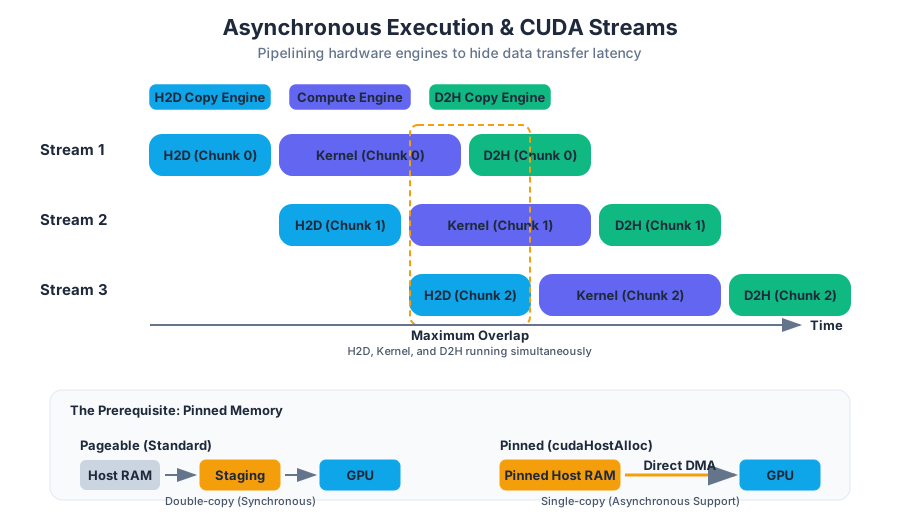
AI_SVGI_SVG## The Mechanics of Asynchrony At its core, asynchronous execution relies on the fact that the CUDA driver and the GPU hardware possess independent engines for different tasks. Most modern NVIDIA GPUs feature:
- One or more Compute Engines: Responsible for executing kernels.
- Two or more Copy Engines: Dedicated hardware for moving data between host and device (H2D) and device to host (D2H).
Because these engines are independent, a GPU can simultaneously execute a kernel while transferring data for the next kernel and sending results from the previous kernel back to the CPU.
The CUDA Stream: The Unit of Concurrency
A CUDA Stream is a sequence of operations that execute in issue-order on the GPU. While operations within a single stream are guaranteed to execute sequentially, operations in different streams may execute concurrently or be interleaved by the hardware scheduler.
Definition: A CUDA Stream is a software abstraction representing a queue of GPU commands. Commands in different streams can overlap, provided the hardware has sufficient resources (e.g., available SMs or Copy Engines).
Pinned Memory (Page-Locked Memory)
To achieve true asynchronous data transfers, one must first understand the relationship between the CPU's RAM and the GPU. By default, host memory is pageable. The Operating System may move this memory to different physical locations or swap it to disk.
When you perform a standard cudaMemcpy, the driver must first copy the data from your pageable buffer into a "pinned" (page-locked) staging buffer, then initiate a Direct Memory Access (DMA) transfer to the GPU. This double-copy is a major bottleneck.
Pinned Memory is host memory that is locked into physical RAM. Because it cannot be swapped out, the GPU's DMA engine can access it directly without CPU intervention.
| Feature | Pageable Memory | Pinned Memory (cudaHostAlloc) |
|---|---|---|
| Allocation | malloc or new |
cudaHostAlloc or cudaMallocHost |
| Transfer Speed | Lower (requires staging) | Higher (direct DMA) |
| Asynchrony | Synchronous only | Supports cudaMemcpyAsync |
| OS Impact | Flexible, low impact | Reduces available system RAM |
| Best Use Case | Small, infrequent data | Large datasets, streaming, real-time |
Why Pinned Memory is Required for Async
The cudaMemcpyAsync function returns control to the CPU immediately. If the memory were pageable, the OS might move the data while the GPU is trying to read it, leading to memory corruption or system crashes. Pinned memory provides the stability required for the hardware to manage the transfer independently of the CPU's memory management unit.
CUDA Streams: Default vs. Non-Default
Every CUDA application has a Default Stream (also known as the Null Stream). If you do not specify a stream when launching a kernel or calling a memory copy, the operation is assigned to the default stream.
The Null Stream Trap
Historically, the default stream was a "synchronizing stream." Any operation submitted to the default stream would wait for all other streams to finish, and no other stream could start until the default stream operation was complete. While modern CUDA allows for a "per-thread default stream" (compiled with --default-stream per-thread), the legacy behavior remains a common pitfall for developers expecting concurrency.
| Stream Type | Concurrency Behavior | Use Case |
|---|---|---|
| Default (Null) Stream | Blocks other streams; synchronous with host. | Simple scripts, debugging, serial logic. |
| Non-blocking Stream | Created with cudaStreamNonBlocking. Does not sync with Null stream. |
High-performance pipelining. |
| Priority Stream | Created with cudaStreamCreateWithPriority. |
Latency-critical tasks (e.g., UI or real-time control). |
Pipelining: Overlapping Computation and Communication
The primary motivation for using multiple streams is Pipelining. By breaking a large dataset into smaller "chunks" and processing them in different streams, we can hide the cudaMemcpy latency behind the kernel execution time.
The "4-Way Overlap" Pattern
In a typical pipelined implementation, we aim for the following overlap:
- Stream 1: Copying Chunk $N+1$ to Device.
- Stream 2: Executing Kernel on Chunk $N$.
- Stream 3: Copying Results of Chunk $N-1$ to Host.
If the time taken for the kernel execution is greater than or equal to the time taken for memory transfers, the data movement effectively becomes "free" in terms of total wall-clock time.
// High-signal example: Pipelined execution using multiple streams
void executePipeline(float* h_data, int totalSize, int chunkSize) {
    const int numStreams = 4;
    cudaStream_t streams[numStreams];
    for (int i = 0; i < numStreams; ++i) cudaStreamCreate(&streams[i]);

    for (int i = 0; i < totalSize; i += chunkSize) {
        int s = (i / chunkSize) % numStreams;
        int size = min(chunkSize, totalSize - i);

        // 1. Asynchronous H2D Copy
        cudaMemcpyAsync(d_in[s], &h_data[i], size * sizeof(float),
                        cudaMemcpyHostToDevice, streams[s]);

        // 2. Asynchronous Kernel Launch
        processKernel<<<grid, block, 0, streams[s]>>>(d_in[s], d_out[s], size);

        // 3. Asynchronous D2H Copy
        cudaMemcpyAsync(&h_results[i], d_out[s], size * sizeof(float),
                        cudaMemcpyDeviceToHost, streams[s]);
    }

    // Synchronize all streams before returning
    for (int i = 0; i < numStreams; ++i) {
        cudaStreamSynchronize(streams[i]);
        cudaStreamDestroy(streams[i]);
    }
}
AI_DEMOI_DEMO## CUDA Events: Synchronization and Timing
As we move toward asynchronous execution, we lose the ability to use standard CPU timers (like std::chrono) to measure GPU performance, because the CPU timer will stop as soon as the command is issued, not when it is finished.
CUDA Events are markers that can be inserted into a stream. They serve two primary purposes:
- Timing: Measuring the elapsed time between two points in GPU execution.
- Synchronization: Coordinating dependencies between different streams.
Event-Based Timing
To time a kernel accurately, you record a "start" event before the launch and a "stop" event after. You then use cudaEventElapsedTime to calculate the duration in milliseconds. This is more accurate than CPU-side timing because it measures the actual hardware execution time.
Cross-Stream Dependencies
Sometimes, Stream B depends on a result produced by Stream A. Rather than synchronizing the entire device (which is expensive), we can use cudaStreamWaitEvent. This tells Stream B to pause until a specific event in Stream A has been recorded, allowing all other streams to continue unimpeded.
Synchronization Primitives
Managing asynchrony requires a nuanced understanding of when to wait. CUDA provides several levels of synchronization, ranging from "heavy" (blocking the whole system) to "light" (waiting for a specific task).
| Function | Scope | Impact |
|---|---|---|
cudaDeviceSynchronize() |
Global | Blocks the host until all issued CUDA calls in all streams are complete. |
cudaStreamSynchronize(stream) |
Stream-level | Blocks the host until all commands in the specified stream are complete. |
cudaEventSynchronize(event) |
Event-level | Blocks the host until the specified event is recorded by the GPU. |
cudaStreamWaitEvent(stream, event) |
Device-side | Non-blocking for host. The specified stream waits for the event, but the CPU continues. |
Key Insight: Always prefer the narrowest possible synchronization. Using
cudaDeviceSynchronize()in a high-performance loop is a common anti-pattern that destroys the benefits of using multiple streams.
Unified Memory and Asynchrony
With the introduction of Unified Memory (UM) and cudaMallocManaged, the lines between host and device memory have blurred. In a UM context, the CUDA driver handles data migration automatically via page faults.
However, asynchrony is still vital. By using cudaStreamAttachMemAsync, developers can associate specific managed memory regions with specific streams. This hints to the driver that the data should be migrated to the GPU in anticipation of a kernel launch in that stream, effectively pre-fetching data and reducing the latency of on-demand page faulting.
Common Pitfalls and Best Practices
1. The "Implicit Sync" Trap
Certain CUDA operations cause an implicit synchronization of the entire device, even if you are using streams. These include:
- Any memory allocation/deallocation on the device (
cudaMalloc,cudaFree). - Setting device flags or configurations.
- Memory copies to/from the "constant" memory space.
- The default (null) stream behavior (unless compiled with per-thread default stream).
2. Resource Contention
While you can create hundreds of streams, the hardware has a limited number of Hardware Work Queues (often referred to as HyperQ). If you exceed the number of hardware queues (typically 32 on modern architectures), the streams will be multiplexed, and you may lose the benefits of true concurrency.
3. Forgetting Pinned Memory
A common mistake is calling cudaMemcpyAsync on a pointer allocated with malloc. In this case, the call will behave synchronously, blocking the host until the transfer is complete, because the driver cannot safely perform a DMA transfer from pageable memory.
4. Stream Priorities
In complex applications (like a game engine or a self-driving car system), some tasks are more urgent than others. Use cudaStreamCreateWithPriority to ensure that latency-sensitive kernels (like sensor processing) are scheduled ahead of throughput-heavy tasks (like background logging) when SM resources are scarce.
AI_FLASHCARDSI_FLASHCARDS## Summary of Execution Flow
- Allocate host memory as pinned (
cudaHostAlloc). - Create multiple non-default streams (
cudaStreamCreate). - Issue asynchronous commands (
cudaMemcpyAsync,kernel<<<... , stream>>>) to different streams. - Use Events for fine-grained synchronization and timing.
- Synchronize only when necessary, and at the narrowest scope possible.
By mastering these concepts, a developer transforms the GPU from a simple math accelerator into a sophisticated, multi-tasking parallel processor capable of overlapping every stage of the data processing pipeline.
Source Materials
Study 2.1.Intro to CUDA C++ with AI — Free on Lykke
Sign up for free to generate personalized flashcards, quizzes, and study guides from this course. Chat with an AI tutor that knows the material.
Get Started FreeView this course wiki on Lykke · Browse all public course wikis