Interactive Demo
POSIX I/O Indirection Demo
POSIX I/O Indirection Demo is a free, interactive learning demo from the Systems Programming in C and Unix Environments course on Lykke. It helps you build intuition for POSIX File Model, File Descriptors (STDIN/STDOUT/STDERR), System Calls (open, read, write, close), Vectored I/O (writev). Play with it directly in your browser — it features 6 buttons. This demo lives in the “File Systems and POSIX I/O Streams” section of the course.
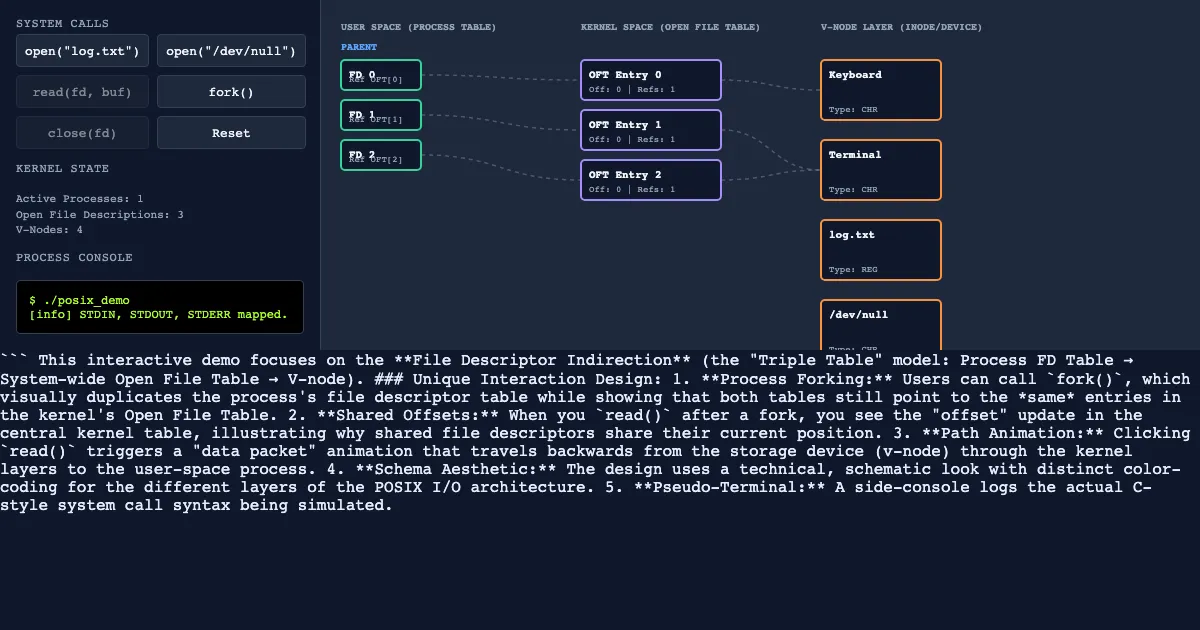
How to use this demo
- Use the “open("log.txt")”, “open("/dev/null")”, “read(fd, buf)”, “fork” buttons to trigger actions or reset the demo.
- Experiment freely — there's nothing to break, and every change is reversible.
What you'll explore
- POSIX File Model
- File Descriptors (STDIN/STDOUT/STDERR)
- System Calls (open, read, write, close)
- Vectored I/O (writev)
- i-nodes and d-nodes
Frequently asked questions
What does the POSIX I/O Indirection Demo demo do?
**Process Forking:** Users can call `fork`, which visually duplicates the process's file descriptor table while showing that both tables still point to the *same* entries in the kernel's Open File Table. **Shared Offsets:** When you `read` after a fork, you see the "offset" update in the central kernel table, illustrating why shared file descriptors share their current position. POSIX I/O Indirection Demo lets you explore this hands-on instead of only reading about it.
What Systems Programming in C and Unix Environments concept does POSIX I/O Indirection Demo teach?
Understanding the POSIX file model and using system calls for low-level I/O operations. It focuses on POSIX File Model, File Descriptors (STDIN/STDOUT/STDERR), System Calls (open, read, write, close), Vectored I/O (writev), i-nodes and d-nodes from the “File Systems and POSIX I/O Streams” section.
What can I control in POSIX I/O Indirection Demo?
The “open("log.txt")”, “open("/dev/null")”, “read(fd, buf)”, “fork” buttons run actions or reset the demo. Every change updates the visualization in real time, so you can see exactly how each variable affects the outcome.
How does POSIX I/O Indirection Demo fit into the Systems Programming in C and Unix Environments course?
This course provides a comprehensive exploration of the interface between software and hardware, focusing on the C programming language and the Unix/POSIX operating system model. Students learn to manage low-level memor… This demo is the interactive piece for the “File Systems and POSIX I/O Streams” section. Open the full Systems Programming in C and Unix Environments course wiki at https://www.getlykke.com/explore/public/systems-programming-in-c-and-unix-6e77335e-38a0-4d8f-91d6-77ac878ffc1b for notes, flashcards, quizzes and the other demos.
What will I understand better after using POSIX I/O Indirection Demo?
You'll build intuition for POSIX File Model, File Descriptors (STDIN/STDOUT/STDERR), System Calls (open, read, write, close), Vectored I/O (writev), i-nodes and d-nodes — and, crucially, see how they behave when you change the inputs, which is hard to get from a textbook or lecture on Systems Programming in C and Unix Environments alone.
From the Systems Programming in C and Unix Environments course
This interactive demo is part of the File Systems and POSIX I/O Streams section. Explore the full Systems Programming in C and Unix Environments course wiki on Lykke — with notes, flashcards, quizzes and more interactive demos.
Open the Systems Programming in C and Unix Environments course →