Interactive Demo
Java Memory Workbench
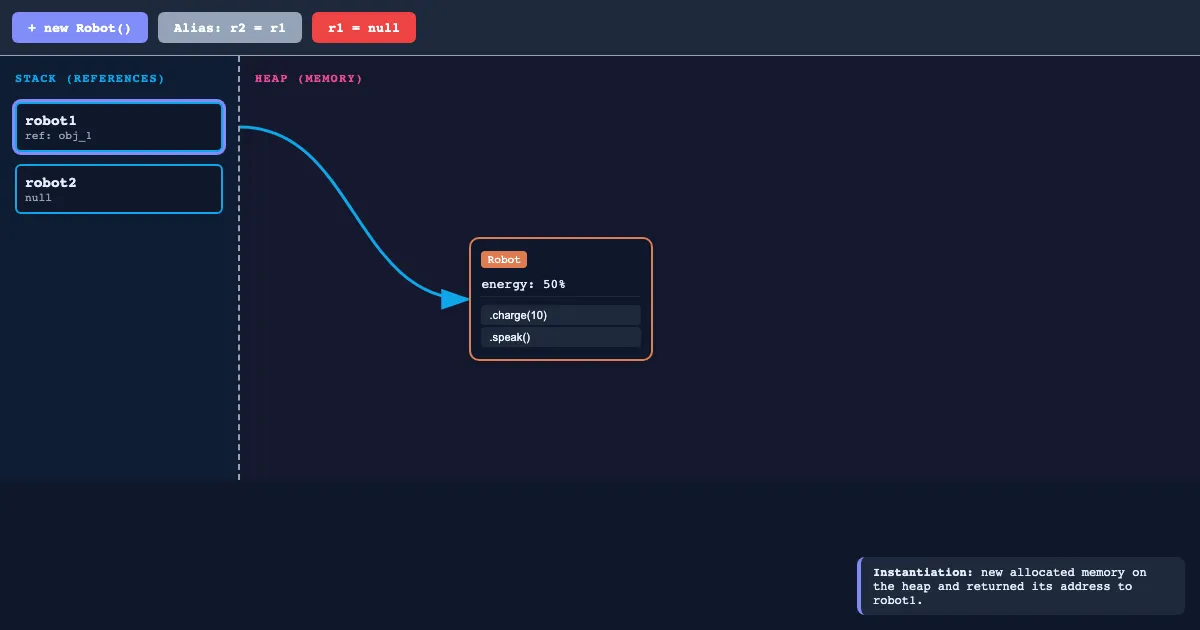
Java Memory Workbench is a free, interactive learning demo from the AP Computer Science A course on Lykke. It helps you build intuition for Objects and Classes, Method Signatures, Parameters and Return Types, String Class Methods. Play with it directly in your browser — it features 5 buttons. This demo lives in the “Unit 1: Using Objects and Methods” section of the course.
How to use this demo
- Use the “+ new Robot”, “Alias: r2 = r1”, “r1 = null”, “.charge(10)” buttons to trigger actions or reset the demo.
- Experiment freely — there's nothing to break, and every change is reversible.
What you'll explore
- Objects and Classes
- Method Signatures
- Parameters and Return Types
- String Class Methods
- Math Class Static Methods
- Wrapper Classes (Integer, Double)
- Constructors and New Keyword
Frequently asked questions
What does the Java Memory Workbench demo do?
Variables on the Stack just hold the "address" (the arrow). Java Memory Workbench lets you explore this hands-on instead of only reading about it.
What AP Computer Science A concept does Java Memory Workbench teach?
Unit 1 introduces the basics of object-oriented programming by teaching students how to interact with existing classes. Students learn to create objects, call methods with parameters, and utilize the standard Java libra… It focuses on Objects and Classes, Method Signatures, Parameters and Return Types, String Class Methods, Math Class Static Methods, Wrapper Classes (Integer, Double) from the “Unit 1: Using Objects and Methods” section.
What can I control in Java Memory Workbench?
The “+ new Robot”, “Alias: r2 = r1”, “r1 = null”, “.charge(10)” buttons run actions or reset the demo. Every change updates the visualization in real time, so you can see exactly how each variable affects the outcome.
How does Java Memory Workbench fit into the AP Computer Science A course?
AP Computer Science A is an introductory college-level course that introduces students to computer science through object-oriented programming using the Java language. The curriculum focuses on the design and implementa… This demo is the interactive piece for the “Unit 1: Using Objects and Methods” section. Open the full AP Computer Science A course wiki at https://www.getlykke.com/explore/public/ap-computer-science-a-cc43040f-cef1-4ab6-a1cc-cf758502c02c for notes, flashcards, quizzes and the other demos.
What will I understand better after using Java Memory Workbench?
You'll build intuition for Objects and Classes, Method Signatures, Parameters and Return Types, String Class Methods, Math Class Static Methods, Wrapper Classes (Integer, Double) — and, crucially, see how they behave when you change the inputs, which is hard to get from a textbook or lecture on AP Computer Science A alone.
From the AP Computer Science A course
This interactive demo is part of the Unit 1: Using Objects and Methods section. Explore the full AP Computer Science A course wiki on Lykke — with notes, flashcards, quizzes and more interactive demos.
Open the AP Computer Science A course →